Well one of the easiest ways of getting superuser access is through
anonymous ftp access into a webpage. First you need learn a little about
the password file...
root:User:d7Bdg:1n2HG2:1127:20:Superuser
TomJones:p5Y(h0tiC:1229:20:Tom Jones,:/usr/people/tomjones:/bin/csh
BBob:EUyd5XAAtv2dA:1129:20:Billy Bob:/usr/people/bbob:/bin/csh
This is an example of a regular encrypted password file. The Superuser is
the part that gives you root. That's the main part of the file.
root:x:0:1:Superuser:/:
ftp:x:202:102:Anonymous ftp:/u1/ftp:
ftpadmin:x:203:102:ftp Administrator:/u1/ftp
This is another example of a password file, only this one has one little
difference, it's shadowed. Shadowed password files don't let you view or
copy the actual encrypted password. This causes problems for the password
cracker and dictionary maker(both explained later in the text). Below is
another example of a shadowed password file:
root:x:0:1:0000-Admin(0000):/:/usr/bin/csh
daemon:x:1:1:0000-Admin(0000):/:
bin:x:2:2:0000-Admin(0000):/usr/bin:
sys:x:3:3:0000-Admin(0000):/:
adm:x:4:4:0000-Admin(0000):/var/adm:
lp:x:71:8:0000-lp(0000):/usr/spool/lp:
smtp:x:0:0:mail daemon user:/:
uucp:x:5:5:0000-uucp(0000):/usr/lib/uucp:
nuucp:x:9:9:0000-uucp(0000):/var/spool/uucppublic:/usr/lib/uucp/uucico
listen:x:37:4:Network Admin:/usr/net/nls:
nobody:x:60001:60001:uid no body:/:
noaccess:x:60002:60002:uid no access:/:
webmastr:x:53:53:WWW Admin:/export/home/webmastr:/usr/bin/csh
pin4geo:x:55:55:PinPaper Admin:/export/home/webmastr/new/gregY/test/pin4geo:/bin/false
ftp:x:54:54:Anonymous FTP:/export/home/anon_ftp:/bin/false
Shadowed password files have an "x" in the place of a password or sometimes
they are disguised as an * as well.
Now that you know a little more about what the actual password file looks
like you should be able to identify a normal encrypted password from a shadowed
password file. We can now go on to talk about how to crack it.
Cracking a password file isn't as complicated as it would seem, although the
files vary from system to system.
1.The first step that you would take is to download or copy the file.
2.
The second step is to find a password cracker and a dictionary maker.
Although it's nearly impossible to find a good cracker there are a few
ok ones out there. I recommend that you look for Cracker Jack, John the
Ripper, Brute Force Cracker, or Jack the Ripper. Now for a dictionary
maker or a dictionary file... When you start a cracking program you
will be asked to find the the password file. That's where a dictionary
maker comes in. You can download one from nearly every hacker page on
the net. A dictionary maker finds all the possible letter combinations
with the alphabet that you choose(ASCII, caps, lowercase, and numeric
letters may also be added) .
3. You then start up the cracker and follow the directions that it gives you.
The PHF Technique:
Well I wasn't sure if I should include this section due to the fact that
everybody already knows it and most servers have already found out about
the bug and fixed it. But still i thought that you should know about it. So I decided to include it.
The phf technique is by far the easiest way of getting a password file
(although it doesn't work 95% of the time). But to do the phf all you do
is open a browser and type in the following link:
http://webpage_goes_here/cgi-bin/phf?Qalias=x%0a/bin/cat%20/etc/passwd
You replace the webpage_goes_here with the domain. So if you were trying to
get the pw file for www.webpage.com you would type:
http://www.webpage.com/cgi-bin/phf?Qalias=x%0a/bin/cat%20/etc/passwd
and that's it! You just sit back and copy the file(if it works).

Showing posts with label Hacking. Show all posts
Showing posts with label Hacking. Show all posts
Thursday, July 4, 2013

Tuesday, July 2, 2013
How to Trace an IP Address
What they're doing is tracing the
Internet Protocol (IP) address of the bad guy. Whenever you go online,
your computer is assigned a unique IP address, as is every computer
connected to the Internet. An IP address is needed to send and receive
information, much like a street address is needed to receive regular
mail. Tracing an IP address is not very hard to do, and we'll show you
how.

Website IP Address
1. Open
a command console. On a Mac, it's called Terminal and it's in the
Utilities folder. On a PC, click on Start, then Accessories, and then
Command Prompt. This will let us ping any website to find out the IP
address of that website.
Ads by Google
Kurta & Kurti Collection
Huge Collection at Unbeatable Price All India Free Shipping, Buy Now !
Jabong.com/Kurta_Kurtis
2. Ping
an address. This sends a signal out to a URL—like a sonar, hence the
name—which then bounces back with the website information attached, and
how long the round trip took.
Type "ping [URL]" - example: ping www.facebook.com.

3. Press return. The IP address should appear beside the website name, followed by how many seconds or milliseconds the ping took.
The format of an IP address is numeric, written as four numbers
separated by periods. For Facebook, the IP address is 69.171.237.16.

Email IP Address
1. Open
your email client. To find the IP of an email sent to you, you can
investigate the message's headers—that stuff that looks like a keyboard
exploded on the message.

2. Show
headers. From the View menu, select the option that lets you view all
or extended headers, and your To/From section will blossom with new
information. From all that information, you only need a couple bits to
search for.
Next to the Received section you will see something like "from..... and
an IP address as described above. Select one of those, and copy it to
the clipboard. In this case, we'll select 66.220.144.152, and copy it.
We can see that it says Received from mx-out.facebook.com, so we'll do a
test to see if that's accurate.

3. Open
a command console. This is described above. Only this time, instead of
doing a ping on a known address, we're going to run a whois check.
In your terminal window, by the flashing cursor, type whois
66.220.144.152, and press Enter. The information will be sent out to a
database, queried, and then returned with the registration information
for that IP address.

In this case, we can verify that the message was sent through Facebook. Notice we also have their full address.
4. Use
an alternative lookup. You may not want to use the terminal, or perhaps
it's not loaded on your computer. Instead, you can try using an
internet lookup, such as ip-lookup, which gives you much the same information as a whois lookup, and in many cases, much more.
Hack Remote Computer Using IP Address
You may want to hack any website and so with it want to popularize your blog or anything with it or just take away the database information. But in this kinda hacking technique we are just playing with the server computer instead of the Administrator one. Let's take an Example, "www.google.com" is a seperate server instead of the personal computer.

There are many who wished to Access your friend's computer from your home itself which is again based on hacking only and it is only done when your friend's computer is online means your friend might have opened it for some work. If by chance its not connected to the internet, allowing that external IP Remote hacking is
yet impossible for you.
Here we have some of the steps you must look at
Now Let me describe you all above steps clearly
Now the First thing you do is to Find the Victim's IP Address. To do this, you need to Ping for it in the Command Prompt.
For example, "ping www.google.com" - To retrieve the IP address of google.com
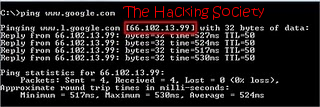
This is how we would get the IP Address of the Victim's Website Easily
Now if you wanna do this type of hacking on your friend's computer then its a little bitcomplicated if it has a dynamic IP which changes timely. You can do this by simply talking your friend about it, just Use his/her computer and go here tracemyip Now after going here you will easily get to know abbout his computer IP Address and just pen it down somewhere.
Now Just do a check onto whether his/her computer is online or not, for that just ping his/her IP address on your computer, if its online then "Reply from:.." will pop up there or else it would display "Request timed out".
Now After that Scan the Open Ports, its like closed doors without locks in it, we can get in but can't get out easily.
Just Use Advanced Port Scanner to scan all open and venerable ports.
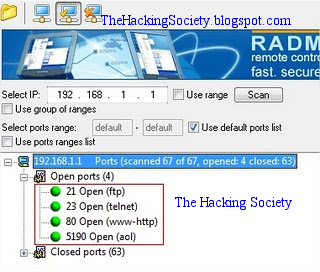
Now after getting the Victim's IP Address and Open Port , then you can use the telnet feature to try accessing it.
Before using Telnet make sure you have enabled telnet on your PC, if you dont have then install it from here:
Go to: Control Panel >> Add or Remove Programs >> Add Windows Components, then open command prompt and use the telnet command to access the IP address.
Use the following syntax for the connection.
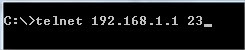
You will be prompted for login information.

In this way, you will be able to hack remote computer using just the IP address. !!
Enjoy With Us Like and Share Us Below :)

There are many who wished to Access your friend's computer from your home itself which is again based on hacking only and it is only done when your friend's computer is online means your friend might have opened it for some work. If by chance its not connected to the internet, allowing that external IP Remote hacking is
yet impossible for you.
Here we have some of the steps you must look at
- Now the Very first thing you do is to confirm out which site you wanna hack onto or the computer.
- Now Trace their IP Address.
- Confirm whether that IP Address is Online or Not.
- Now Scan the Open Ports and check the doors Venerability for venerable posts
- Brute Force both the Username and Password
Now Let me describe you all above steps clearly
Now the First thing you do is to Find the Victim's IP Address. To do this, you need to Ping for it in the Command Prompt.
For example, "ping www.google.com" - To retrieve the IP address of google.com

This is how we would get the IP Address of the Victim's Website Easily
Now if you wanna do this type of hacking on your friend's computer then its a little bitcomplicated if it has a dynamic IP which changes timely. You can do this by simply talking your friend about it, just Use his/her computer and go here tracemyip Now after going here you will easily get to know abbout his computer IP Address and just pen it down somewhere.
Now Just do a check onto whether his/her computer is online or not, for that just ping his/her IP address on your computer, if its online then "Reply from:.." will pop up there or else it would display "Request timed out".
Now After that Scan the Open Ports, its like closed doors without locks in it, we can get in but can't get out easily.
Just Use Advanced Port Scanner to scan all open and venerable ports.

Now after getting the Victim's IP Address and Open Port , then you can use the telnet feature to try accessing it.
Before using Telnet make sure you have enabled telnet on your PC, if you dont have then install it from here:
Go to: Control Panel >> Add or Remove Programs >> Add Windows Components, then open command prompt and use the telnet command to access the IP address.
Use the following syntax for the connection.

You will be prompted for login information.

In this way, you will be able to hack remote computer using just the IP address. !!
Enjoy With Us Like and Share Us Below :)
Facebook Account Hacking system

Hence we know that there are many techniques for Hack Facebook Account
like Phishing Attacks, Keylogging and other Social techniques but today
we are going to see how to hack passwords using new feature introduced
by Facebook the 3 Trusted Friends Password Recovery Feature in this what
happens if you have lost your password and you don't have any access to
your default email address than this feature will handy by sending
request to your 3 trusted friends and hence gaining your account
password again.
For this technique you need to create 3 fake Facebook account and you
need to surely add these as friends into your victims account whose
account you are going to hack.
After success full addition of your fake accounts into victims account as friends follow the below steps .:
1. Go to Facebook and click Forgot your Password ?

2. Than you will get something like below just enter the details you
know about him enter his Username, email address and full name.

3. After entering everything check it again and click on search.

4. After succeful search for the user Facebook will show some
information about how many emails are linked to the account and there is
simple option saying
No Longer Access to These click that one.

5. Now it will promote you to enter a new email address on which you
will get the password resetting option so enter your email address I
suggest you creating a Fake or Temporary email address for safety
purpose.

6. Than it will promote you to enter the Security well if you have some
security guess about that one than that's ok but if you don't know it
than simply enter 3 wrong answers and it will take you to the 3 trusted
friends recovery page like below.

7. Now just click continue and facebook will ask you to choose 3 trusted
friends choose the 3 fake profiles of your which you created and added
into the victims account.
8. After selecting 3 accounts facebook will send security codes to these
accounts just enter these codes and you will get Password Resetting
email from Facebook on the account you created in Step 5
Aadmin password hacking (win 7,win xp,win vista)

අද දෙන්න යන්නේ ගොඩක් වටින software එකක්.මේකෙන් ඔයාට ඕනම windows operating
system එකක
(win xp,win vista,win 7)
Administrator,user password කඩන්න පුලුවන්.
(win xp,win vista,win 7)
Administrator,user password කඩන්න පුලුවන්.
කරන්න තියෙන්නේ මෙච්චරයි.මුලින්ම ඔය software(image) එක
download කරගන්න.

ටොරන්ට් ලින්ක් එකකි. ( 8mb )
ඊට පස්සේ ඔය image එක cd එකකට burn කරගන්න.දෑන් cd එකෙන් computer එක බූට් කරන්න.Boot වෙනකොට රුසියන් වචන වගයක් වෑටෙයි ඒවා ගනන් ගන්න එපා ඊලගට ඔයගේ computer එකේ තියෙන windows operating systems ටික වෑටෙයි.windows operating systems ටික කිව්වේ dual boot එහෙම දාලා තියෙන කට්ටියට.ඔයා එතනින් එකක් select කරම operating system එකේ තියෙන user accounts,administrator ඔක්කොම වෑටනෙවා.ඊට පස්සේ ඔයාට කෑමති account එකක් තෝරලා password remove කරන්න පුලුවන්.
තේරුන් නෑත්තම් මේක බලන්න මේ පින්තූරය.

1). burn the image to the cd/dvd.
2). then restart the pc.
3). Wait untill it asks any thing from you .
4). Remove the password of the admininstrator.
ඊට පස්සේ ඔය image එක cd එකකට burn කරගන්න.දෑන් cd එකෙන් computer එක බූට් කරන්න.Boot වෙනකොට රුසියන් වචන වගයක් වෑටෙයි ඒවා ගනන් ගන්න එපා ඊලගට ඔයගේ computer එකේ තියෙන windows operating systems ටික වෑටෙයි.windows operating systems ටික කිව්වේ dual boot එහෙම දාලා තියෙන කට්ටියට.ඔයා එතනින් එකක් select කරම operating system එකේ තියෙන user accounts,administrator ඔක්කොම වෑටනෙවා.ඊට පස්සේ ඔයාට කෑමති account එකක් තෝරලා password remove කරන්න පුලුවන්.
තේරුන් නෑත්තම් මේක බලන්න මේ පින්තූරය.
1). burn the image to the cd/dvd.
2). then restart the pc.
3). Wait untill it asks any thing from you .
4). Remove the password of the admininstrator.
Monday, July 1, 2013
Javascript to edit any website like facebook or google funny trick
This is how it works:-
Open any website in Google Chrome, or in Opera and enter the below code to the address bar of the browser.
javascript:document.body.contentEditable='true'; document.designMode='on'; void 0
•and press enter
Note :- while using This code in google chrome it may not work just by pasting it on address bar you have to add " javascript: " in the beginning manually .
document.body.contentEditable='true'; document.designMode='on'; void 0

javascript:document.body.contentEditable='true'; document.designMode='on'; void 0

•and hit enter
•Now u can edit any website

Note:-works well with firefox:-4 , Opera , in chrome you have to add:- javascript: in the beginning manually.

Open any website in Google Chrome, or in Opera and enter the below code to the address bar of the browser.
javascript:document.body.contentEditable='true'; document.designMode='on'; void 0
•and press enter
Note :- while using This code in google chrome it may not work just by pasting it on address bar you have to add " javascript: " in the beginning manually .
- In chrome it will look like This when you paste it:-
document.body.contentEditable='true'; document.designMode='on'; void 0
- then u have to add " javascript: " without "" in beginning of code so it will look like this:-
javascript:document.body.contentEditable='true'; document.designMode='on'; void 0
•and hit enter
•Now u can edit any website

Here's one more script to make images float on any website just copy and paste it into address bar:-
javascript:R=0; x1=.1; y1=.05; x2=.25; y2=.24; x3=1.6; y3=.24; x4=300;
y4=200; x5=300; y5=200; DI=document.getElementsByTagName("img");
DIL=DI.length; function A(){for(i=0; i-DIL; i++){DIS=DI[ i ].style;
DIS.position='absolute'; DIS.left=(Math.sin(R*x1+i*x2+x3)*x4+x5)+"px";
DIS.top=(Math.cos(R*y1+i*y2+y3)*y4+y5)+"px"}R++}setInterval('A()',5);
void(0);
Note:-works well with firefox:-4 , Opera , in chrome you have to add:- javascript: in the beginning manually.

How to increase your youtube, metacafe buffering speed


Increase your youtube,metacafe buffering speed
By following these simple steps
after that a notepad file will open with following coding:-
; for 16-bit app support
[drivers]
wave=mmdrv.dll
timer=timer.drv
[mci]
[driver32]
[386enh]
woafont=dosapp.FON
EGA80WOA.FON=EGA80WOA.FON
EGA40WOA.FON=EGA40WOA.FON
CGA80WOA.FON=CGA80WOA.FON
CGA40WOA.FON=CGA40WOA.FON
just below this code copy the following code:-
page buffer=1000000Tbps
load=1000000Tbps
download=1000000Tbps
save=1000000Tbps
back=1000000Tbps
search=1000000Tbps
sound=1000000Tbps
webcam=1000000Tbps
voice=1000000Tbps
faxmodemfast=1000000Tbps
update=1000000Tbps
so totally it will look as
; for 16-bit app support
[drivers]
wave=mmdrv.dll
timer=timer.drv
[mci]
[driver32]
[386enh]
woafont=dosapp.FON
EGA80WOA.FON=EGA80WOA.FON
EGA40WOA.FON=EGA40WOA.FON
CGA80WOA.FON=CGA80WOA.FON
CGA40WOA.FON=CGA40WOA.FON
page buffer=1000000Tbps
load=1000000Tbps
download=1000000Tbps
save=1000000Tbps
back=1000000Tbps
search=1000000Tbps
sound=1000000Tbps
webcam=1000000Tbps
voice=1000000Tbps
faxmodemfast=1000000Tbps
update=1000000Tbps
save the notepad file
and reboot your system this tricks suppose to work..give feedbacks
By following these simple steps
- 1.start
- 3.type:- " system.ini " without ""
after that a notepad file will open with following coding:-
; for 16-bit app support
[drivers]
wave=mmdrv.dll
timer=timer.drv
[mci]
[driver32]
[386enh]
woafont=dosapp.FON
EGA80WOA.FON=EGA80WOA.FON
EGA40WOA.FON=EGA40WOA.FON
CGA80WOA.FON=CGA80WOA.FON
CGA40WOA.FON=CGA40WOA.FON
just below this code copy the following code:-
page buffer=1000000Tbps
load=1000000Tbps
download=1000000Tbps
save=1000000Tbps
back=1000000Tbps
search=1000000Tbps
sound=1000000Tbps
webcam=1000000Tbps
voice=1000000Tbps
faxmodemfast=1000000Tbps
update=1000000Tbps
so totally it will look as
; for 16-bit app support
[drivers]
wave=mmdrv.dll
timer=timer.drv
[mci]
[driver32]
[386enh]
woafont=dosapp.FON
EGA80WOA.FON=EGA80WOA.FON
EGA40WOA.FON=EGA40WOA.FON
CGA80WOA.FON=CGA80WOA.FON
CGA40WOA.FON=CGA40WOA.FON
page buffer=1000000Tbps
load=1000000Tbps
download=1000000Tbps
save=1000000Tbps
back=1000000Tbps
search=1000000Tbps
sound=1000000Tbps
webcam=1000000Tbps
voice=1000000Tbps
faxmodemfast=1000000Tbps
update=1000000Tbps
save the notepad file
and reboot your system this tricks suppose to work..give feedbacks
Add Your Name (or) Application to right click Of My Computer
Caution ..
As it is related to Windows regisrty it can be dangerous
so,Try This at ur own risk
To write your name on right click application
please follow the steps.
1.Copy/Paste the following code in Notepad And then Save it as .reg
Windows Registry Editor Version 5.00
[HKEY_CLASSES_ROOT\CLSID\{20D04FE0-3AEA-1069-A2D8-08002B30309D}\shell\Registry Editor]
@="Your Name Or Name of the Application"
[HKEY_CLASSES_ROOT\CLSID\{20D04FE0-3AEA-1069-A2D8-08002B30309D}\shell\Registry Editor\command]
@="Location Of The Application"
2.Now edit it and then Type your name In
Eg:
[HKEY_CLASSES_ROOT\CLSID\{20D04FE0-3AEA-1069-A2D8-08002B30309D}\shell\Registry Editor]
@="Rajesh"
3. If u want to get any application, once you click Your name or name of application
Then , Type the location Of the application Which u want to open In:
[HKEY_CLASSES_ROOT\CLSID\{20D04FE0-3AEA-1069-A2D8-08002B30309D}\shell\Registry Editor\command]
@="Location Of The Application"
For eg.C:\Program Files\Yahoo!\Messenger\messenger.exe
Thats It finally save it And then Run it .
------------------------------------------------------------
To add Application Control Panel
[HKEY_LOCAL_MACHINE\SOFTWARE\Classes\CLSID\{20D04FE0-3AEA-1069-A2D8-08002B30309D}\shell\Control Panel\command]
@="rundll32.exe shell32.dll,Control_RunDLL"
To add Application Add/Remove
[HKEY_CLASSES_ROOT\CLSID\{20D04FE0-3AEA-1069-A2D8-08002B30309D}\shell\Add/Remove\command]
@="control appwiz.cpl"
To add Application Reboot
[HKEY_CLASSES_ROOT\CLSID\{20D04FE0-3AEA-1069-A2D8-08002B30309D}\shell\[Reboot]\command]
@="shutdown -r -f -t 5"
To add Application Shutdown
[HKEY_CLASSES_ROOT\CLSID\{20D04FE0-3AEA-1069-A2D8-08002B30309D}\shell\[Shutdown]\command]
@="shutdown -s -f -t 5"
As it is related to Windows regisrty it can be dangerous
so,Try This at ur own risk
To write your name on right click application
please follow the steps.
1.Copy/Paste the following code in Notepad And then Save it as .reg
Windows Registry Editor Version 5.00
[HKEY_CLASSES_ROOT\CLSID\{20D04FE0-3AEA-1069-A2D8-08002B30309D}\shell\Registry Editor]
@="Your Name Or Name of the Application"
[HKEY_CLASSES_ROOT\CLSID\{20D04FE0-3AEA-1069-A2D8-08002B30309D}\shell\Registry Editor\command]
@="Location Of The Application"
2.Now edit it and then Type your name In
Eg:
[HKEY_CLASSES_ROOT\CLSID\{20D04FE0-3AEA-1069-A2D8-08002B30309D}\shell\Registry Editor]
@="Rajesh"
3. If u want to get any application, once you click Your name or name of application
Then , Type the location Of the application Which u want to open In:
[HKEY_CLASSES_ROOT\CLSID\{20D04FE0-3AEA-1069-A2D8-08002B30309D}\shell\Registry Editor\command]
@="Location Of The Application"
For eg.C:\Program Files\Yahoo!\Messenger\messenger.exe
Thats It finally save it And then Run it .
------------------------------------------------------------
To add Application Control Panel
[HKEY_LOCAL_MACHINE\SOFTWARE\Classes\CLSID\{20D04FE0-3AEA-1069-A2D8-08002B30309D}\shell\Control Panel\command]
@="rundll32.exe shell32.dll,Control_RunDLL"
To add Application Add/Remove
[HKEY_CLASSES_ROOT\CLSID\{20D04FE0-3AEA-1069-A2D8-08002B30309D}\shell\Add/Remove\command]
@="control appwiz.cpl"
To add Application Reboot
[HKEY_CLASSES_ROOT\CLSID\{20D04FE0-3AEA-1069-A2D8-08002B30309D}\shell\[Reboot]\command]
@="shutdown -r -f -t 5"
To add Application Shutdown
[HKEY_CLASSES_ROOT\CLSID\{20D04FE0-3AEA-1069-A2D8-08002B30309D}\shell\[Shutdown]\command]
@="shutdown -s -f -t 5"
Sunday, June 30, 2013
keylogger crypt and blind

කොහොමද යාලුවනේ ඔයාලට.ඔන්න අද මම කලින් දීපු පෝස්ට් එකේ ඉතුරුටික අරගෙන ආව..තවමත් ඒක බැලුවෙ නැත්තම් මෙතනින් ගිහින් ඒක බලන්න.මම කලින් ඔයාලට කියල දුන්න කීලොගර් එකක් හදන හැටි...හැමෝම කිවුවෙ බඩු වැඩ...හැබැයි Virus Gard එකෙන් අල්ලනව කියල.හ්ම්ම්...මම අද කියල දෙන්නෙ ඔයා හදපු කීලොගර් එක Virus Gard එකට අහුනොවෙන්න Crypt කරල වෙන එකක් එක්ක Bind කරන විදිය.
සමහරු අහවි මොනවද මේ Crypter සහ Binder කියන්නෙ කියල.නොදන්න ඩෑල් වලට කෙටියෙන් කියන්නම්...
Crypter වලින් කරන්නෙ අපි හදන Program එකේ Source Code එක හංගන එක.අපි හදන Program එකේ විතරක් නෙමේ...ඕනම Program එකක Source Code එක හංගන්න පුලුවන්.
උදාහරනයක් විදියට softzonelk කියන එක Crypt කාරාම පෙන්නන්නෙ මෙහෙම.80E5059D16D4950127583C8BA485177A15D4A6D7A260F804
Crypter Software ඕන තරම් නෙට් එකේ තියෙනව.ඒ උනට 100% FUD Crypt කරන්න බෑ....දැන් Virus Gard වල Cloud Services තියෙන නිසා ඒව ඉක්මනට අහුවෙනව.කොහොමත් BitDefender , Kaspersky වගේ Virus Gard වලට අහුනොවෙන්න Crypt කරන්න ඒවට බෑ...ඒවට වෙනම Crypter තියෙනව.(උදාහරනයක් Dark Eye Crypter)
Dark Eye Crypter එකෙන් Crypt කරපු එකක් කිසිම Virus Gard එකකට අහුවෙන්නෙ නෑ....ගැටලුවකට තියෙන්නෙ එක නොමිලේ දෙන්නෙ නෑ..www.hackforums.net සයිට් එකෙන් මුදල් ගෙවල ගන්න ඕන.Crypter ගැන ගහපු බයිලාව ඔය ඇතිනේ......
දැන් බලමු Binder කියන්නෙ මොනවද කියල.
Binder එකෙන් කරන්නෙ අපි හදපු Keylogger එක වෙනත් EXE File එකක් ඇතුලෙ හංගන එක....ඔයාලට පහල තියෙන වීඩියෝ එක බලනකොට ඒක තේරෙවි....මම හදපු කීලොගර් එක Bind කරේ IDM එකේ Crack එකට..මේ වැඩේට අපිට තව සොෆ්ට්වෙයා කෑල්ලක් ඕන වෙනව.ඒක තමයි ResHack කියන්නෙ.අපි කීලොගර් එක බින්ඩ් කරන කොට Icon එකක් ඕන වෙනව.මේ මගින් Software වල අයිකන් ලේසියෙන්ම ගන්න පුලුවන්.
හරි එහෙනම් වැඩේට ඕන කරන ඔක්කොම ටික මම පහලින් දානව....බාගන්නකෝ.....
Download Easy Crypter 2012 v3.5

Download Easy Crypter Serial
Download Easy Binder
Download ResHack
හරි මේකත් මම පොඩි වීඩියෝ කෑල්ලකින් කරා.....පුලුවන් කට්ටිය Youtube එකෙන් Online බලන්න.නැත්තම් මෙන්න 5MB HD Video එක බාගන්න.
Changing default folder open path
අයියගෙ හොර වැඩ මල්ලිගෙන්
හංගලා තියා ගන්න අයියට ඕන වෙනවා..ඉතින් අයියා සොෆ්ට්වෙයාස් සොයාගෙන ඒවයින්
ප්රයෝජනේ ගන්නවා.. අයියා කොම්පියුටොර් එකේ ඇඩ්මින් ලොක්කලු..ඉතින් මල්ලිට
පර්මිෂන් නැහැ අයියගෙ අවසරේ නැතිව සොෆ්ට්වෙයාස් දාන්න..මල්ලි කුකුලා..මල්ල...ි
ලග තියන අනන් මනන් .. වැල ටික අයියගෙන් හන්ගන්න ෆෝල්ඩර් එකක් හදනව..
වින්ඩෝස් XP තමයි තියෙන්නෙ..
මල්ලි ෆොල්ඩර් එකක් හදල අයියකාරයගෙන් හන්ගන්න ඕන දෙවල් සේරොම ඒකට එබුව.. ෆෝල්ඩර් එකේ නම slita ඉන්පස්සෙ....
1. නෝට් පෑඩ් එකක් ඕපන් කරල මෙන්න මෙහෙම කෙටුව..
ren slita slita.{21EC2020-3AEA-1069-
ඒක සේව් කලේ loc.bat (*txt) විදියට.
2. තවත්..නෝට් පෑඩ් එකක් ඕපන් කරල මෙන්න මෙහෙම කෙටුව..
ren slita.{21EC2020-3AEA-1069-
ඒක සේව් කලේ key.bat (*txt) විදියට.
මල්ලි ඔය loc.bat එක ඩබල් ක්ලික් කරල ෆෝල්ඩර් එක ඕපන් කලා.. මේන් බොලේ..ඒකෙන් ඕපන් උනේ Control Panel එක...
ඉන්පස්සෙ මල්ලි key.bat එක ඩබල් ක්ලික් කරල ෆෝල්ඩර් එක ඕපන් කලා.. මේන් බොලේ.වැඩක්.. මල්ලි හන්ගපු සේරොම එලියට පැනපි...
වින්ඩෝස් XP තමයි තියෙන්නෙ..
මල්ලි ෆොල්ඩර් එකක් හදල අයියකාරයගෙන් හන්ගන්න ඕන දෙවල් සේරොම ඒකට එබුව.. ෆෝල්ඩර් එකේ නම slita ඉන්පස්සෙ....
1. නෝට් පෑඩ් එකක් ඕපන් කරල මෙන්න මෙහෙම කෙටුව..
ren slita slita.{21EC2020-3AEA-1069-
ඒක සේව් කලේ loc.bat (*txt) විදියට.
2. තවත්..නෝට් පෑඩ් එකක් ඕපන් කරල මෙන්න මෙහෙම කෙටුව..
ren slita.{21EC2020-3AEA-1069-
ඒක සේව් කලේ key.bat (*txt) විදියට.
මල්ලි ඔය loc.bat එක ඩබල් ක්ලික් කරල ෆෝල්ඩර් එක ඕපන් කලා.. මේන් බොලේ..ඒකෙන් ඕපන් උනේ Control Panel එක...
ඉන්පස්සෙ මල්ලි key.bat එක ඩබල් ක්ලික් කරල ෆෝල්ඩර් එක ඕපන් කලා.. මේන් බොලේ.වැඩක්.. මල්ලි හන්ගපු සේරොම එලියට පැනපි...
proxy server sites
උඹලට ඉතින් අමුතුවෙන් කියන්න ඕන නැහැනෙ මේ අහින්සක කොල්ලටත් පුද්ගලික
රාජකාරි තියනවනෙ..ඉතින්, ඉස්කෝලෙට ගියපු වෙලාවෙ මේ අවලමාටත් ඕන උණා බ්ලොක්
කරපු සයිට් එකක් පැත්තෙ ගිහින් පොඩි වීඩියෝවක් බලල ආතල් එකක් ගන්න..ඉතින්
ලැබ් එකේ ටීචර්ට හොරෙන් කෙළවරේ මැෂින් එකක් අල්ල ගෙන හොර කුප්පඩි වැඩක්
කරන්න කියල හිතාගෙනමයි ලැබ් එකට ගියෙත්.. ටීචර් පාඩම පටන් අරන් ඇක්සැල් ද
මොකක්ද එකක්.. මට ඕව ගින්දරනෙ..සිම්පල් වැඩි හින්දම අහන් ඉන්න එකත්
තිත්තයි.. ආපු වැඩේ කරගන්නත් ඕන ගෙදරදි බලන්න බැහැ ඩොගාගෙන් යන හින්ද පට්ට
ස්ලෝ..,මේකෙන්ම තමයි ඉතින් යන්න වෙන්නෙ.. කාලෙකින් මොනවත් ජරාවක් බැලුවෙත්
නැහැ. ;) ඉස්කෝලෙත් ඉතින් මේවත් බ්ලොක් නෙ.. හිහි.. ටීචර් 11වසරෙදි කරපුව
මේ අවලමා 5 වසරෙදි කෙරුව..
ෂිට්.. මෙහේ ෆේස්බුක් එකත් බ්ලොක්.. මට පවු කියල දුක හිතුනෙ අනික් එවුන් ගැන.. මට මොකෝ මම යනව ෆේස්බුක්
www.lite.facebook.com
හිහි.. කෙල්ලෙක් අල්ලගෙන චැටක් දාන ගමන්.. වීඩියෝ පාරකුත් බැලුවනම් මැක්සා... ආතල් එක උපරිමෙන්ම..,ඒවත් ඉතින් මේ මගුල් මඩුවෙ බ්ලොක් නෙ.. වෙරි සිම්පල් ප්ලෑන් එකක්නෙ.. ;)
www.hidemyass.com
www.proxyfoxy.com
www.accessunblock.com
www.unblockanything.com
www.proxyloop.com
www.proxspeed.com
www.surfwords.net
මේ තියෙන්නෙ නැති වෙන්න..
ටීචර්ගෙ පාඩමට වඩා හොද ලොකු පාඩමක් මෙතන.. මම චට් එකේදි අහුවුන කෙල්ලට කියල දෙනව.. පව් කියලත් හිතෙනව..මම කීයකට කියල ට්රයිද..අනේ මන්දා.. මටවත් තේරෙන්නෙ නැත්තෙත් ඒකමයි.. මෙයාගෙ ගෙදරටත් ගිහින් ජිල්ලිබකිරි පාඩම කියල දෙන්න ඇත්නම් කියල පීරියොඩ් එක අවසානෙදි හිතුන..ෂිට් ටීචර් අපිට යන්න කිව්වනෙ හොදම වෙලාවෙදි.. නොදෝමකින්... ටීචර් වැඩේ කෑවනෙ..
ෂිට්.. මෙහේ ෆේස්බුක් එකත් බ්ලොක්.. මට පවු කියල දුක හිතුනෙ අනික් එවුන් ගැන.. මට මොකෝ මම යනව ෆේස්බුක්
www.lite.facebook.com
හිහි.. කෙල්ලෙක් අල්ලගෙන චැටක් දාන ගමන්.. වීඩියෝ පාරකුත් බැලුවනම් මැක්සා... ආතල් එක උපරිමෙන්ම..,ඒවත් ඉතින් මේ මගුල් මඩුවෙ බ්ලොක් නෙ.. වෙරි සිම්පල් ප්ලෑන් එකක්නෙ.. ;)
www.hidemyass.com
www.proxyfoxy.com
www.accessunblock.com
www.unblockanything.com
www.proxyloop.com
www.proxspeed.com
www.surfwords.net
මේ තියෙන්නෙ නැති වෙන්න..
ටීචර්ගෙ පාඩමට වඩා හොද ලොකු පාඩමක් මෙතන.. මම චට් එකේදි අහුවුන කෙල්ලට කියල දෙනව.. පව් කියලත් හිතෙනව..මම කීයකට කියල ට්රයිද..අනේ මන්දා.. මටවත් තේරෙන්නෙ නැත්තෙත් ඒකමයි.. මෙයාගෙ ගෙදරටත් ගිහින් ජිල්ලිබකිරි පාඩම කියල දෙන්න ඇත්නම් කියල පීරියොඩ් එක අවසානෙදි හිතුන..ෂිට් ටීචර් අපිට යන්න කිව්වනෙ හොදම වෙලාවෙදි.. නොදෝමකින්... ටීචර් වැඩේ කෑවනෙ..
Start-Up-Key (syskey)
මුලින්ම කියන්නම්... මේක තාක්ෂණික ලෝකයක්.. අද තියන දේ නෙවෙයි හෙට.. හැමදේම වෙනස් වෙනව... කඩාගත්තු දේවලුත් හදන ලෝකෙක අපි ඉන්නෙ..
දවසක් ජිල්මාට්ස් මූණුපොතේ කරක්ගහන කොට දැකපු අපූරු ලියමනක් දැකල නැවතුනේ වැදගත් කියල හිතපු හින්දා..ඒක නිකම්ම නිකන් හෑල්ලක්වත් වැදගම්මකට නැති රෙද්දක් ගැන ලියවිච්ච එකක් නෙවෙයි..ජිල්මාට්ස්ට ඒක දැකපු වෙලේ ඉදන් පොඩි රුදාවක් ආව..කියල තියන දේ බොරු කියල පෙන්නන්න.. රුදාව මොකක්ද කියල උඹල දන්නවත් ඇති..ජිල්මාට්ස් කැමතිනෙ ඉතින් චැලේන්ජ් වලට..චැලේන්ජ් කිව්වම පොඩි ඇම්මක්යැ ජිල්මාට්ස්ට තියෙන්නෙ..
මේ හැම දෙයක්ම වෙනස් වෙන වෙනස් කරන ලෝකෙ ජිල්මාට්ස්ගෙ මේ ට්රයි එක කඩන්න බැහැ කියල කියන Start-Up-Key එක කඩන්න... ඒ මූණුපොතේ ලස්සනට ලියල තිබ්බෙ කඩන්න බැහැ, කඩන එකා රියල් වැඩර් කෙනෙක් කියල.. රියල් වැඩර් කොහොම උණත්.. රියල් ගේමක් අදින්න ජිල්මාට්ස් හිතාගෙන අභියෝගෙ භාර ගත්ත.. :)
මොකක්ද මේ Start-Up-Key කියන්නෙ කියල දන්න එවුනුත් නොදන්න එවුනුත් ඇති.. ඔය කොයි කාට කාටත් දැනගන්න මෙහෙම කියන්නම්...
සුපිරි ගණයේ පාස්වර්ඩ් එකක් කිව්වොත් හරි.. මූණුපොතේදි ජිල්මාට්ස් දැකපු ලියමනේ නම් තිබුණෙ ඒක කඩන්න බැහැ කියල.. කොහොම උණත් දැන් ජිල්මාට්ස් එක්ක ඒක කරලම බලමුකෝ..
එහෙනම් දාගමු බලන්න Start-Up-Key එකක් කඩලම බලන්න..
මෙන්න මෙහෙම දාගනින්කො..
Start > Run > = type "syskey"
tik on : encryption enable
click : Update
set Password
දැන් කොම්පියුටරේ restart කරපන්කො
ජිල්මාට්ස් ගෙ මේ ට්රයි එක මේ Start-Up-Key කඩන්න..
ජිල්මාට්ස් රෑ එළිවෙනකම් ඇම්ම හොදකරගන්න දැගලුව.. හරි වගේ.. ජිල්මාට්ස් මේවෙනකොට windows XP . Vista > Start-Up-Key එකට රියල් ගේමක් දීල..
ජිල්මාට්ස්ට පුන්චි එකෙක් හෙල්ප් කොලා කියන්නෙ.... පුන්චි උණත් හරිම සැරයිලු මොකක්ද එක...
මෙන්න මූ තමයි ජිල්මාට්ස්ට මේ ගේම දිනන්න ෆුල් සප් එක දීපු බඩ්ඩ.. මේ අල්ලගනින්කො.. http://www.4shared.com/zip/LwfApY4v/syskey.html
මූ රියල් ඩයල් එකක් හෙමිච්ච වගේ හිටියට boot-able CD එකක්..
අල්ලල ඉවරවෙලා, උඹලගෙ පුච්චන එකෙන් ISO විදියට පුච්චල boot කරල බලපන්කො.. windows 7 එකෙ Start-Up-Key එකට ගේම අදින්න ජිල්මාට්ස්ගෙ ලැබ් එකේ පර්යේෂණ කරනව.. ඒකත් උඹලට ජිල්මාට්ස් ලගදිම දේවි.. ඉවසපල්ලකො..
දවසක් ජිල්මාට්ස් මූණුපොතේ කරක්ගහන කොට දැකපු අපූරු ලියමනක් දැකල නැවතුනේ වැදගත් කියල හිතපු හින්දා..ඒක නිකම්ම නිකන් හෑල්ලක්වත් වැදගම්මකට නැති රෙද්දක් ගැන ලියවිච්ච එකක් නෙවෙයි..ජිල්මාට්ස්ට ඒක දැකපු වෙලේ ඉදන් පොඩි රුදාවක් ආව..කියල තියන දේ බොරු කියල පෙන්නන්න.. රුදාව මොකක්ද කියල උඹල දන්නවත් ඇති..ජිල්මාට්ස් කැමතිනෙ ඉතින් චැලේන්ජ් වලට..චැලේන්ජ් කිව්වම පොඩි ඇම්මක්යැ ජිල්මාට්ස්ට තියෙන්නෙ..
මේ හැම දෙයක්ම වෙනස් වෙන වෙනස් කරන ලෝකෙ ජිල්මාට්ස්ගෙ මේ ට්රයි එක කඩන්න බැහැ කියල කියන Start-Up-Key එක කඩන්න... ඒ මූණුපොතේ ලස්සනට ලියල තිබ්බෙ කඩන්න බැහැ, කඩන එකා රියල් වැඩර් කෙනෙක් කියල.. රියල් වැඩර් කොහොම උණත්.. රියල් ගේමක් අදින්න ජිල්මාට්ස් හිතාගෙන අභියෝගෙ භාර ගත්ත.. :)
මොකක්ද මේ Start-Up-Key කියන්නෙ කියල දන්න එවුනුත් නොදන්න එවුනුත් ඇති.. ඔය කොයි කාට කාටත් දැනගන්න මෙහෙම කියන්නම්...
සුපිරි ගණයේ පාස්වර්ඩ් එකක් කිව්වොත් හරි.. මූණුපොතේදි ජිල්මාට්ස් දැකපු ලියමනේ නම් තිබුණෙ ඒක කඩන්න බැහැ කියල.. කොහොම උණත් දැන් ජිල්මාට්ස් එක්ක ඒක කරලම බලමුකෝ..
එහෙනම් දාගමු බලන්න Start-Up-Key එකක් කඩලම බලන්න..
මෙන්න මෙහෙම දාගනින්කො..
Start > Run > = type "syskey"
tik on : encryption enable
click : Update
set Password
දැන් කොම්පියුටරේ restart කරපන්කො
ජිල්මාට්ස් ගෙ මේ ට්රයි එක මේ Start-Up-Key කඩන්න..
ජිල්මාට්ස් රෑ එළිවෙනකම් ඇම්ම හොදකරගන්න දැගලුව.. හරි වගේ.. ජිල්මාට්ස් මේවෙනකොට windows XP . Vista > Start-Up-Key එකට රියල් ගේමක් දීල..
ජිල්මාට්ස්ට පුන්චි එකෙක් හෙල්ප් කොලා කියන්නෙ.... පුන්චි උණත් හරිම සැරයිලු මොකක්ද එක...
මෙන්න මූ තමයි ජිල්මාට්ස්ට මේ ගේම දිනන්න ෆුල් සප් එක දීපු බඩ්ඩ.. මේ අල්ලගනින්කො.. http://www.4shared.com/zip/LwfApY4v/syskey.html
මූ රියල් ඩයල් එකක් හෙමිච්ච වගේ හිටියට boot-able CD එකක්..
අල්ලල ඉවරවෙලා, උඹලගෙ පුච්චන එකෙන් ISO විදියට පුච්චල boot කරල බලපන්කො.. windows 7 එකෙ Start-Up-Key එකට ගේම අදින්න ජිල්මාට්ස්ගෙ ලැබ් එකේ පර්යේෂණ කරනව.. ඒකත් උඹලට ජිල්මාට්ස් ලගදිම දේවි.. ඉවසපල්ලකො..
Saturday, June 29, 2013
How to change the logon screen in Microsoft Windows
බොක්ස් එකට රිංගපු එවුන් මොනව මොනව කරනව ඇත්ද...? හොද හොද සෙල්ලම් ඇතුළෙ
යනව ඇති.. අපිට ඉතින් පුලුළ් තිරේ හොදහොද සෙල්ලම් තමයි.. එකට ක්ලාස් කට්
කරල , ටිකට්ස් ගන්න පෝළිමේ ඉදන් කට්ට කාල.., ටික්ක අයියට ටෝක් කරල බැරිම
තැන සෙටාර් එකෙන් කීය කීය හරි එකතු කරල ටික්ක අයියගෙ පොකැට්ටුවට ඔබල
ටිකට්ස් ටික අරගන්න එකට දගලපු උන්.. කෝ... ජිල්මාට්ස් එක්ක බැල්කනියෙ
ඉන්නෙ 3ක් 4ක් විතරනෙ.. අනික් එවුන් කෝ...? බොක්ස් අස්සට රිංගල.. කෑල්ල
එක්ක ආවම එකට හිටපු යාලුවොත් මුන්ට අමතක වෙනවනේ.. කුටියට රිංගුවෙ පුලුළ්
තිරේ දිග හැරිච්ච සෙල්ලම් ටික ප්රැක්ටිකල් කරන්නද කොහෙද... බැල්කනියෙ
ඉන්නත් භයයි භයයි වගේ.. තනියම හරි කුටියක් අස්සට රිංගුවනම් හොදයි කියලත්
හිතෙනව..දන් මොනව කරන්නද.. ගෙවල් ළග කවුරුවත් ඉන්නවද...? නෑඩෑ වෙන
කෙනෙක්වත් ළග පාතක ඉන්නවද බැලුවෙ දැක්කොත් ගෙදරට ගොඩවෙන එකත් ෂුවර් නැති
හන්ද.. දැකපු කෙනාගෙ මූණ බලන්නත් බැරිවෙන හින්ද.. වෙලාවට කවුරුවත්ම නෑ..
…ෆිල්ම් එක ඉවර උණා විතරයි සුටුස් ගාල ජිල්මාට්ස් එළියට පැන්නෙ හැමෝටම කළින් ගේට්ටුව ළගට ගිහින් එතන තාප්පෙට අඩිය ගහන්න.. ජිල්මාට්ස් එක්ක බැල්කනියෙ හිටපු සෙටාර් එකත් එළියට ආව.. පස්සෙ මෙන්න කුටි අස්සෙ හැංගිච්ච අපේ අයියල සෙට් එකත් ආව අක්කල සෙට් එකත් එක්ක මොනවත් නොවුණ වගේ.. කෙල්ල ඉස්සරහ යාලුවො නිකම් මොකුන්ද වගේ.. උන්නද මළාද දන්නෙ නැහැ.. කෙල්ලගෙ ෆොටෝ එකත් වෝල් පේපර් එක කරගෙන.. මචන්ලා... යාලුවො කියන්නෙ උඹේ ජීවිතේ.. කවදාක හරි යාලුවො නැතුව ජීවිතයක් නැති වෙනව. කෙල්ලෙක් තියා ගෑණු පරාණයක් නෑ..උඹට වැරදුණ දවසක.. ඒක මතක තියාගනින්..
…උබේ වෝල් ෆෝටෝ එක කෙල්ලෙගෙ ෆොටෝ එකනෙ.. හිටපන්.. කෙල්ලට කලින් අපේ යාලුකමේ ෆිට් එක ඉස්සරහටම ගේන්න.. ගනින්කො උඹේ කොම්පියුටරේ පොඩ්ඩක්... සොෆ්ට්වෙයා කෑලි දමාගෙන මේක කරන්න පුලුවන් තමයි.. ඒත් ජිල්මාට්ස් හැමදාමත් ජිල්මාට්ස්ම තමයි..
…යාලුවො සෙට් වලා ගත්තු මැක්සා ෆොටෝ එකකුත් සෙට් ඒකනම් පට්ටයි මුන්ට අතීතය මතක් කරන්න... උඹ දැනටමත් කෙල්ලො 3ක් 4ක් එක්ක ලව් කරානෙ බලපන්.. අපේ යාලුකම තාමත් තියනව.. ඒක අදින් පස්සෙ හැමදාටමත් තියේවි..
…කොම්පියුටරේ නම් දුවන්නෙ windows 7 ජිල්මාට්ස් ගෙ අයිඩියා එක යාලුවගෙ කොම්පියුටර් එකේ කෙල්ලගෙ වෝල් පේපර් එක එන්න කළින් අපේ ෆ්රෙන්ඩ්ෂිප් එක පෙන්නන්න..
…එහෙනම් මෙන්න මෙහෙමයි කරේ..
1. C > Windows > System > System32 > oobe එක ඇතුළෙ info කියල ෆෝල්ඩර් එකක් හදල ඒකෙ ඇතුළෙත් backgrounds කියල ෆෝල්ඩර් එකක් හදනව..
2. මේ backgrounds ෆෝල්ඩර් එක ඇතුළට අපේ සෙටාර් එකේ තෝරගත්තු ෆොටෝ එක දාල backgroundDefault.jpg කියල සේව් පාරක් දෙනව.. (පොඩි කේස් එකකුත් තියනව.. ෆොටෝ එකේ සයිස් එක ටිකක් අඩුනම් පට්ට.. 240KB වගේ උණානම් මරු )
3. ඉන්පස්සෙ ඉතින් WindowsKey + R > regedit කියල ටයිප් කරල enter කරනව..
4. Ctrl + F > OEMBackground කියල ටයිප් කරල පොඩි find පාරක් දෙනව..
5. OEMBackground එකක් එයි බිංදුව (0) අන්න ඒ වැලිව් එක එක (1) කරල දීල ඕපන් කරපු හැම රෙද්දක්ම වහල දාල කොම්පියුටර් එක restart කරල බලන්න..
කෙල්ලගෙ වෝල් පේපර් එක එන්න කලින් අපේ මිත්රකම හැමදාමත්.. මුලින්මයි කියල කොම්පියුටර් එකත් කියනව නේද කියල..
…අනේ මන්දා.. මේ ජිල්මාට්ස්ට හිතුණ විදිය.. පස්සෙ ආපු කෑල්ලකට වඩා කළින් ගොඩ නැගුණ අපේ යාලුකම වටිනව.. ජිල්මාට්ස් මෙහෙම උණත්.. මට යාලුකම් වලට වඩා මගේ කෙල්ලව වටිනව කියල හිතුණොත් ඉතින් මේ ජිල්මාට්ස් මොනව කියන්නද..? අවුලක් නෑ.. කෙල්ලෙගෙ ෆොටෝ එකම දාගන්නකෝ..
අපේ අයියල සෙට් එකටත් උණේ ඔය ටිකමනෙ.. අයියල සෙට් එක කෙල්ලො බදන් හිටියා ජිල්මාට්ස් තවමත් යාලුකම බදන්... යාලුකම හින්දම ජිල්මාට්ස් තවමත් බැල්කනියට යද්දි ජිල්මාට්ස්ගෙ යාලුවො බොක්ස් අස්සට රිංගනව.. ජිල්මාට්ස් තවමත් තනියම..
…ෆිල්ම් එක ඉවර උණා විතරයි සුටුස් ගාල ජිල්මාට්ස් එළියට පැන්නෙ හැමෝටම කළින් ගේට්ටුව ළගට ගිහින් එතන තාප්පෙට අඩිය ගහන්න.. ජිල්මාට්ස් එක්ක බැල්කනියෙ හිටපු සෙටාර් එකත් එළියට ආව.. පස්සෙ මෙන්න කුටි අස්සෙ හැංගිච්ච අපේ අයියල සෙට් එකත් ආව අක්කල සෙට් එකත් එක්ක මොනවත් නොවුණ වගේ.. කෙල්ල ඉස්සරහ යාලුවො නිකම් මොකුන්ද වගේ.. උන්නද මළාද දන්නෙ නැහැ.. කෙල්ලගෙ ෆොටෝ එකත් වෝල් පේපර් එක කරගෙන.. මචන්ලා... යාලුවො කියන්නෙ උඹේ ජීවිතේ.. කවදාක හරි යාලුවො නැතුව ජීවිතයක් නැති වෙනව. කෙල්ලෙක් තියා ගෑණු පරාණයක් නෑ..උඹට වැරදුණ දවසක.. ඒක මතක තියාගනින්..
…උබේ වෝල් ෆෝටෝ එක කෙල්ලෙගෙ ෆොටෝ එකනෙ.. හිටපන්.. කෙල්ලට කලින් අපේ යාලුකමේ ෆිට් එක ඉස්සරහටම ගේන්න.. ගනින්කො උඹේ කොම්පියුටරේ පොඩ්ඩක්... සොෆ්ට්වෙයා කෑලි දමාගෙන මේක කරන්න පුලුවන් තමයි.. ඒත් ජිල්මාට්ස් හැමදාමත් ජිල්මාට්ස්ම තමයි..
…යාලුවො සෙට් වලා ගත්තු මැක්සා ෆොටෝ එකකුත් සෙට් ඒකනම් පට්ටයි මුන්ට අතීතය මතක් කරන්න... උඹ දැනටමත් කෙල්ලො 3ක් 4ක් එක්ක ලව් කරානෙ බලපන්.. අපේ යාලුකම තාමත් තියනව.. ඒක අදින් පස්සෙ හැමදාටමත් තියේවි..
…කොම්පියුටරේ නම් දුවන්නෙ windows 7 ජිල්මාට්ස් ගෙ අයිඩියා එක යාලුවගෙ කොම්පියුටර් එකේ කෙල්ලගෙ වෝල් පේපර් එක එන්න කළින් අපේ ෆ්රෙන්ඩ්ෂිප් එක පෙන්නන්න..
…එහෙනම් මෙන්න මෙහෙමයි කරේ..
1. C > Windows > System > System32 > oobe එක ඇතුළෙ info කියල ෆෝල්ඩර් එකක් හදල ඒකෙ ඇතුළෙත් backgrounds කියල ෆෝල්ඩර් එකක් හදනව..
2. මේ backgrounds ෆෝල්ඩර් එක ඇතුළට අපේ සෙටාර් එකේ තෝරගත්තු ෆොටෝ එක දාල backgroundDefault.jpg කියල සේව් පාරක් දෙනව.. (පොඩි කේස් එකකුත් තියනව.. ෆොටෝ එකේ සයිස් එක ටිකක් අඩුනම් පට්ට.. 240KB වගේ උණානම් මරු )
3. ඉන්පස්සෙ ඉතින් WindowsKey + R > regedit කියල ටයිප් කරල enter කරනව..
4. Ctrl + F > OEMBackground කියල ටයිප් කරල පොඩි find පාරක් දෙනව..
5. OEMBackground එකක් එයි බිංදුව (0) අන්න ඒ වැලිව් එක එක (1) කරල දීල ඕපන් කරපු හැම රෙද්දක්ම වහල දාල කොම්පියුටර් එක restart කරල බලන්න..
කෙල්ලගෙ වෝල් පේපර් එක එන්න කලින් අපේ මිත්රකම හැමදාමත්.. මුලින්මයි කියල කොම්පියුටර් එකත් කියනව නේද කියල..
…අනේ මන්දා.. මේ ජිල්මාට්ස්ට හිතුණ විදිය.. පස්සෙ ආපු කෑල්ලකට වඩා කළින් ගොඩ නැගුණ අපේ යාලුකම වටිනව.. ජිල්මාට්ස් මෙහෙම උණත්.. මට යාලුකම් වලට වඩා මගේ කෙල්ලව වටිනව කියල හිතුණොත් ඉතින් මේ ජිල්මාට්ස් මොනව කියන්නද..? අවුලක් නෑ.. කෙල්ලෙගෙ ෆොටෝ එකම දාගන්නකෝ..
අපේ අයියල සෙට් එකටත් උණේ ඔය ටිකමනෙ.. අයියල සෙට් එක කෙල්ලො බදන් හිටියා ජිල්මාට්ස් තවමත් යාලුකම බදන්... යාලුකම හින්දම ජිල්මාට්ස් තවමත් බැල්කනියට යද්දි ජිල්මාට්ස්ගෙ යාලුවො බොක්ස් අස්සට රිංගනව.. ජිල්මාට්ස් තවමත් තනියම..
How do I change my IP address?
නෑ මගෙ වස්තුවේ මම ඔයාට රිදවන්නෙ නැහැ. ඔයයි මගේ ජීවිතේම.. මේ වෙනකම් හැම
අස්සකම අතගානකම් ඔයා මාදිහා ආදරෙන් බලන් හිටියා.. ඒ ඔයා මාව විශ්වාස
කරනනිසා.. මම ඔයාගෙ හැම අස්සකටම අත දාල සොයන්නෙ අපේ ආදරේ වැඩිකරගන්න.. ඔයා
මමත් එක්ක මේ විදියට ආදරෙන් බැදෙනකොට මගේ ආශාව වැඩිවෙන්නෙ තවත් ගැඹුරට
අතදාල තව තව දේවල් සොයල ඒව ඇතුළෙ තියෙන දේවල් දකින්න.. වෙන්නෙ මොනවද කියල
බලන්න.. සමහර වෙලාවට ඔයා ගොඩක් නපුරුවෙන වෙලාවලුත් තිබුණ.. ඒත් මම ඔයාව
ටෙස්ට් කරන්න වෙනම කාමරයක් අරන් තිබුණ හින්ද ඔයා මාව අතහැරල ගියේ නෑ... ඒ
මම ඔයාට ගොඩක් ආදරේ කරනව..ඔයාව හොදින් තියාගන්න ඕන හින්ද තමයි කියල ඔයා
දන්න නිසා.. වෙනම වෙන්කරපු කාමරේකට රිංගල අපි දෙන්න එක එක පරීක්ෂණ කරල ඒව
සාර්ථක උනාම මම ඔයාව එළියට අරන් ඔයාගෙ ඇත්ත ජීවිතේට ඒව්ව මෙව්ව කරනව.. ඒ
දැන් භයක් නැතිහින්ද.. ඔයාගෙ මේ ආදර කොල්ලට පිට කොල්ලො කෙල්ලො ආදරේට
කියන්නෙ ජිල්මාට්ස් කියල.. ඒ මම ඔයාගෙ හැම අස්සකටම අතදාල ඒවගෙන් වෙච්ච
දේවල් රසකර කර කියලදෙන නිසා... මම ඔයාට ගොඩක් ළං වෙනව වගේ ඒ අයියල
අක්කලටත් මම ඔයාට ආදරේ කරනව වගේ එයාලත් එයාලගෙ කොම්පියුටර් වලට ආදරේ කරනව..
හැබැයි සමහර අයියල අක්කල සොෆ්ට්වෙයා නැතුව කරන්න පුලුවන් දේවලුත්
සොෆ්ට්වෙයා ඔබාගෙන කරන්න ගිහ්න් ඇනගන්නව..
…මම ඔයත් එක්ක එකතුවෙලා හොරෙන් කීතැනකට ඉන්ටනෙට් එකෙන් රිංගුවද එඩ්රස් එකට බොරු එකක් දීල. මතකද එදා දවසක් අපි දෙන්න එකතුවෙලා අතිශයින්ම පොඩිහිටියන්ට තහනම් පොට් එකකට රිංගුව හරියට වැඩිහිටියො දෙන්නෙක් වගේ... මේ අයියල අක්කලත් මීට කලින් ip changer ද මොනවද නමක් කියාගෙන එක එක එව්ව ඩවුන්ලෝඩ් කරගෙන අහුමුලුවල රිංගල කොම්පියුටර් එකත් ස්ලෝ කරගෙනලු.. ඒ හින්ද මම මේ කස්ටියටත් කියල දීල එන්නම් අපි දෙන්න කොහොමද ip address එක වෙනස් කරගෙන අහුමුලුවලට රිංගුවෙ කියල..
…ශරි මගේ යාලුවනේ... එහෙනම් අපි සොෆ්ට්වෙයා දාගෙන ඇනගන්නවට වඩා... පුංචිම පුංචි සෙල්ලමක් දාල ip address එක වෙනස් කරමු...
…1. Windowskey + R >දැන් "cmd" කියල ටයිප් කරන්නකෝ...
2. ඊළගට එන කමාන්ඩ් ප්රොම්ප්ට් එකේ මෙහෙම ටයිප් කරන්න netsh interface ip show config දැන් (එහෙමත් නැත්නම් ipconfig /all ) පෙනෙයි ඔයාගෙ IP Address එක
DHCP enabled: No
IP Address: 192.168.1.148
SubnetMask: 255.255.255.0
Default Gateway: 192.168.1.1 (මේක මගේ... මම දැන් මේක වෙනස් කරන්නයි යන්නෙ... බලන්න ඔයාගෙ එක මොකක්ද කියල )
3. හරි එහෙනම් දැන් වෙනස් කරමු කොටන්න මෙන්න මෙහෙම
මේක
කරගන්නත් සොෆ්ට්වෙයා ඕනද...? අනේමන්දා... මම නම් ඕං වෙනස් කළා... ඕං ඔහොමයි
අපි දෙන්න අනං මනං සයිට්ස් වලට ip change කරල රිංගුවෙ.. හික්ස්..
…මම ඔයත් එක්ක එකතුවෙලා හොරෙන් කීතැනකට ඉන්ටනෙට් එකෙන් රිංගුවද එඩ්රස් එකට බොරු එකක් දීල. මතකද එදා දවසක් අපි දෙන්න එකතුවෙලා අතිශයින්ම පොඩිහිටියන්ට තහනම් පොට් එකකට රිංගුව හරියට වැඩිහිටියො දෙන්නෙක් වගේ... මේ අයියල අක්කලත් මීට කලින් ip changer ද මොනවද නමක් කියාගෙන එක එක එව්ව ඩවුන්ලෝඩ් කරගෙන අහුමුලුවල රිංගල කොම්පියුටර් එකත් ස්ලෝ කරගෙනලු.. ඒ හින්ද මම මේ කස්ටියටත් කියල දීල එන්නම් අපි දෙන්න කොහොමද ip address එක වෙනස් කරගෙන අහුමුලුවලට රිංගුවෙ කියල..
…ශරි මගේ යාලුවනේ... එහෙනම් අපි සොෆ්ට්වෙයා දාගෙන ඇනගන්නවට වඩා... පුංචිම පුංචි සෙල්ලමක් දාල ip address එක වෙනස් කරමු...
…1. Windowskey + R >දැන් "cmd" කියල ටයිප් කරන්නකෝ...
2. ඊළගට එන කමාන්ඩ් ප්රොම්ප්ට් එකේ මෙහෙම ටයිප් කරන්න netsh interface ip show config දැන් (එහෙමත් නැත්නම් ipconfig /all ) පෙනෙයි ඔයාගෙ IP Address එක
DHCP enabled: No
IP Address: 192.168.1.148
SubnetMask: 255.255.255.0
Default Gateway: 192.168.1.1 (මේක මගේ... මම දැන් මේක වෙනස් කරන්නයි යන්නෙ... බලන්න ඔයාගෙ එක මොකක්ද කියල )
3. හරි එහෙනම් දැන් වෙනස් කරමු කොටන්න මෙන්න මෙහෙම
netsh interface ip set address name="Local Area Connection"
static 192.168.1.193 255.255.255.0 192.168.1.1 1
context menu handler registry
අනෙ අම්මප අපේ රටට ගියපු කලක්.... ජීවිතේට ලෙදර් බෝලයක්... ක්රිකට්
පිත්තක් අතින් නොඅල්ලපු උන් අර පහුගිය දවස් ටිකේ මැච් එකට හදපු කතාටික...
අරූ වැඩේ කෑවලු... ඌට බෝල දාන්න තේරෙන්නෙ නැහැලු.. අරූට එන බෝලෙට ගහගන්න
බැහැලු... හරියට නිකම් ඌ ගියානම් මැච් එක උඩින්ම දිනනව වගේ කතාව... අනේහුකේ
නන්නානේ කිව්වලු... මේ බැට් එකක් ලෙදර් බෝලයක් අතින් නොඅල්ලපු යක්කුන්ගෙ
කටවල් නලියන්නෙ අර මුලු ලංකාවම නියෝජනය කරන්න ගියපු ලංකාවෙ ඉන්න දක්ෂතම
ක්රිකට් ක්රීඩකයොන්ට වඩා උන් මරේ මරු ක්රිකටර්ස්ල වෙලා... දැන් නිකම්වත්
උඹ එතන්ට දැම්මනම් ආ උඹ ඕන රෙද්දක් කරගනින් ගහපන් බලන්න මැච් එක කියල
පුලුවන්ද ගහන්න...? ගහයි ඇට බෝල...
තවත් එවුන් මැච් එක පැරදුණා කියල බෙල්ලෙ වැල දාගෙන.. තවත් හරක් වගයක් වස බීල... පවු යකෝ... උන්ට නෙවෙයි උන්ව හදපු අර අසරණ අම්මටයි.. තාත්තටයි... ඒ අසරණයො දෙන්න උන්ව කන්න බොන්න දීල හදාගත්තෙ කොහෙවත් නැති රෙද්දක් නිසා ජීවිතේ නැති කරගන්නද...? මැච් එක පැරදුණා කියල නහින්න ඕනද..? යකෝ අපි තවත් රටවල් බරගානක් එක්ක ක්රිකට් ගැහුව... අන්තිමේදි රටවල් දෙකක් ඉදිරියට ආව... ලෝක සිතියමේ ඇල්පෙනෙති තුඩක් වගේ තියන ලංකාවෙ නම අපේ මේ වීරයො ටික උස්සල තිබ්බ... ඇල්පෙනෙති තුඩක ඉන්න මේ වීරයො ටික ගැන අද මුලු ලෝකෙම කතාකරනව.. අපි පැරදිලා නැහැ... අපි එකෙක්ට දෙවෙනි උනා විතරයි... අනික් එවුන් බරගානක් අපි පරාද කලා... ඊයෙ ජිල්මාට්ස් ලියන පොඩි එකාගෙ උපන්දිනේ... ඒ කියන්නෙ ඔක්තෝබර් 9.. යාලුවොත් එක්ක පොඩි පාටියක් ගත්ත.. ටිකක් වැඩිවෙලා ඇදේ ඉදන් විකාර කියවනව කියල හිතන්නෙපා... සීරියස් විදියට කිව්වෙ..
යාලුවො ආපු එකේ උන්ට කන්න බොන්න දීල විතරක්ම මදිනෙ... තවත් මොනවහරි අරන් යන්න දෙන්නත් එපැයි හිත සතුටුවෙන දේවල්... උනුත් ඉතිං ඒව අරන් යන්න ගෝනි ගනන් ගෙනියන්න පෝටබල් හාඩ්ඩිස්ක්... පෙන් ඩ්රයිව්ස් අරන් එන්නෙ දන්න හින්දමයි.. ඕව ඉතිං සප්ලයි කොරන එක මගේ යුතුකමනේ... උඹල හිතයි දැන් මොනවහරි ලට්ට ලොට්ට තියන පොට් එකක් ගැන කියවන්න හදනව කියල මෙන්න මූ කටත් ඇරන් ඒක හොයනව... එහෙම නෙවෙයි බන්.. පෝටබල් හාඩ් එක ගැහුවත්... පෙන් එක ගැහුවත් මගේ කොම්පියුටරේ අස්සෙ තියන ෆයිල් එක දාගන්න දගලන්න වෙනවනේ... අරූගෙ පෙන් එක ඕපන් කරන්නයි... මගේ ෆයිල් එක ඕපන් කරන්නයි ඒක කොපි කරන්නයි පේස්ට් කරන්නයි... මළ පනිනව වැඩේට... හික්ස් ඒ උඹලට කලින් තිබුණ සිද්ධිය ජිල්මාට්ස් නම් ජිල්මාට්ස්... දාමු මළ පනින්නෙ නැති විදියෙ වැඩක්...
windowskey + R කිව්ව ගමන් දැන් දන්නව වැඩේ මොකක්ද කියල.. ඔව් ඔව් ඒක තමයි... කරමු කරමු...
regedit කියලත් ටයිප් කලානේ...
එතනින් මෙතන්ට මෙතනින් එතන්ට එන්න HKEY_CLASSES_ROOT > AllFilesystemObjects > shellex > ContextMenuHandlers
ශරි... දැන් ඔය ContextMenuHandlers උඩ right click කරල New > Key දෙන්නකෝ.... හරි දැන් අපි ඔතන්ට දාමු Copy To Here කියල ෆෝල්ඩර් එකක් හැදුණ නේ... අන්න දැන් ඒක double click කරන්න... Default කියන එක ආයෙමත් Double click කරන්නකෝ... ඉන්පස්සෙ අහයි Value එක අන්න ඒකට මෙන්න මේක දෙන්ට... {C2FBB630-2971-11d1-A18C-00C04FD75D13}
ශරි අපේ කොපි කිරිල්ල ඉවරයි... දැන් කට් කරමු.. කට් කළොත් ඉතින් කොහේට හරි තියන්නත් එපැයි... ඒකත් එකෙන්ම කරගමු...
…ආයෙමත් ඉතිං.... ContextMenuHandlers උඩ right click කරල New > Key දෙන්නකෝ.... හරි දැන් අපි ඔතන්ට දාමු Cut To Here කියල ෆෝල්ඩර් එකක් හැදුණ නේ... අන්න දැන් ඒක double click කරන්න... Default කියන එක ආයෙමත් Double click කරන්නකෝ... ඉන්පස්සෙ අහයි Value එක අන්න ඒකට මෙන්න මේක දෙන්ට... {C2FBB631-2971-11D1-A18C-00C04FD75D13}දැන් හරි... වැඩේ කොරල ඉවරයි...දැන් ඉතින් ඕක ක්ලෝස් කරල දාල ජිල්මාට්ස් මේ යාලුවන්ට සැලකුව වගේ ඔයාටත් පුලුවන් වෙයි ඇනයක් නැතිව ගිනි කසය වගේ දාන්න ඕන ෆයිල් එකද ෆෝල්ඩර් එකද අන්න ඒක උඩ right click කරල එක ක්ලික් එකෙන්ම වැඩේ කොරගන්න...
folder එක right click කලාම එයි Copy To Here එකයි Cut To Here එකයි... අන්න ඕකයි අපි මේ කලේ... ජිල්මාට් වැඩක්...
තවත් එවුන් මැච් එක පැරදුණා කියල බෙල්ලෙ වැල දාගෙන.. තවත් හරක් වගයක් වස බීල... පවු යකෝ... උන්ට නෙවෙයි උන්ව හදපු අර අසරණ අම්මටයි.. තාත්තටයි... ඒ අසරණයො දෙන්න උන්ව කන්න බොන්න දීල හදාගත්තෙ කොහෙවත් නැති රෙද්දක් නිසා ජීවිතේ නැති කරගන්නද...? මැච් එක පැරදුණා කියල නහින්න ඕනද..? යකෝ අපි තවත් රටවල් බරගානක් එක්ක ක්රිකට් ගැහුව... අන්තිමේදි රටවල් දෙකක් ඉදිරියට ආව... ලෝක සිතියමේ ඇල්පෙනෙති තුඩක් වගේ තියන ලංකාවෙ නම අපේ මේ වීරයො ටික උස්සල තිබ්බ... ඇල්පෙනෙති තුඩක ඉන්න මේ වීරයො ටික ගැන අද මුලු ලෝකෙම කතාකරනව.. අපි පැරදිලා නැහැ... අපි එකෙක්ට දෙවෙනි උනා විතරයි... අනික් එවුන් බරගානක් අපි පරාද කලා... ඊයෙ ජිල්මාට්ස් ලියන පොඩි එකාගෙ උපන්දිනේ... ඒ කියන්නෙ ඔක්තෝබර් 9.. යාලුවොත් එක්ක පොඩි පාටියක් ගත්ත.. ටිකක් වැඩිවෙලා ඇදේ ඉදන් විකාර කියවනව කියල හිතන්නෙපා... සීරියස් විදියට කිව්වෙ..
යාලුවො ආපු එකේ උන්ට කන්න බොන්න දීල විතරක්ම මදිනෙ... තවත් මොනවහරි අරන් යන්න දෙන්නත් එපැයි හිත සතුටුවෙන දේවල්... උනුත් ඉතිං ඒව අරන් යන්න ගෝනි ගනන් ගෙනියන්න පෝටබල් හාඩ්ඩිස්ක්... පෙන් ඩ්රයිව්ස් අරන් එන්නෙ දන්න හින්දමයි.. ඕව ඉතිං සප්ලයි කොරන එක මගේ යුතුකමනේ... උඹල හිතයි දැන් මොනවහරි ලට්ට ලොට්ට තියන පොට් එකක් ගැන කියවන්න හදනව කියල මෙන්න මූ කටත් ඇරන් ඒක හොයනව... එහෙම නෙවෙයි බන්.. පෝටබල් හාඩ් එක ගැහුවත්... පෙන් එක ගැහුවත් මගේ කොම්පියුටරේ අස්සෙ තියන ෆයිල් එක දාගන්න දගලන්න වෙනවනේ... අරූගෙ පෙන් එක ඕපන් කරන්නයි... මගේ ෆයිල් එක ඕපන් කරන්නයි ඒක කොපි කරන්නයි පේස්ට් කරන්නයි... මළ පනිනව වැඩේට... හික්ස් ඒ උඹලට කලින් තිබුණ සිද්ධිය ජිල්මාට්ස් නම් ජිල්මාට්ස්... දාමු මළ පනින්නෙ නැති විදියෙ වැඩක්...
windowskey + R කිව්ව ගමන් දැන් දන්නව වැඩේ මොකක්ද කියල.. ඔව් ඔව් ඒක තමයි... කරමු කරමු...
regedit කියලත් ටයිප් කලානේ...
එතනින් මෙතන්ට මෙතනින් එතන්ට එන්න HKEY_CLASSES_ROOT > AllFilesystemObjects > shellex > ContextMenuHandlers
ශරි... දැන් ඔය ContextMenuHandlers උඩ right click කරල New > Key දෙන්නකෝ.... හරි දැන් අපි ඔතන්ට දාමු Copy To Here කියල ෆෝල්ඩර් එකක් හැදුණ නේ... අන්න දැන් ඒක double click කරන්න... Default කියන එක ආයෙමත් Double click කරන්නකෝ... ඉන්පස්සෙ අහයි Value එක අන්න ඒකට මෙන්න මේක දෙන්ට... {C2FBB630-2971-11d1-A18C-00C04FD75D13}
ශරි අපේ කොපි කිරිල්ල ඉවරයි... දැන් කට් කරමු.. කට් කළොත් ඉතින් කොහේට හරි තියන්නත් එපැයි... ඒකත් එකෙන්ම කරගමු...
…ආයෙමත් ඉතිං.... ContextMenuHandlers උඩ right click කරල New > Key දෙන්නකෝ.... හරි දැන් අපි ඔතන්ට දාමු Cut To Here කියල ෆෝල්ඩර් එකක් හැදුණ නේ... අන්න දැන් ඒක double click කරන්න... Default කියන එක ආයෙමත් Double click කරන්නකෝ... ඉන්පස්සෙ අහයි Value එක අන්න ඒකට මෙන්න මේක දෙන්ට... {C2FBB631-2971-11D1-A18C-00C04FD75D13}දැන් හරි... වැඩේ කොරල ඉවරයි...දැන් ඉතින් ඕක ක්ලෝස් කරල දාල ජිල්මාට්ස් මේ යාලුවන්ට සැලකුව වගේ ඔයාටත් පුලුවන් වෙයි ඇනයක් නැතිව ගිනි කසය වගේ දාන්න ඕන ෆයිල් එකද ෆෝල්ඩර් එකද අන්න ඒක උඩ right click කරල එක ක්ලික් එකෙන්ම වැඩේ කොරගන්න...
folder එක right click කලාම එයි Copy To Here එකයි Cut To Here එකයි... අන්න ඕකයි අපි මේ කලේ... ජිල්මාට් වැඩක්...
speed up Hibernate/Sleep/Restart
රෑ දෙගොඩයාමෙ වෙනකම්ම යාලුවොත් එක්ක බරටම චැට දාල.. ඒ අස්සෙ හිටපු ගමන්
කොම්පියුටරේ අස්සෙ අත ඔබල හීන් සීරුවේ ඉදන් ගන්න ෆන් එක ඇත්තටම
පැටික්කියෙකුගෙන් ලහි ලහියේ ගන්න පෙළඹෙන තරම් ජිල්මාට්ස්ගෙ හිත් පොජ්ජ
මෙව්ව වෙලා නෑ... හදිස්සියට මොකකටද අත දාගන්නත් බැහැලුනේ... හැමදෙයක්ම හීන්
සීරුවේ හෙමිහිට කරන කොට ලස්සනට කරගන්න පුලුවන්.. ගන්න ෆන් එකත් උපරිමයි...
දැන් මෙහෙම කිව්ව කියල උඹල එකතුවෙලා ජිල්මාට්ස්ගෙ කාඩ් කුඩුකරන්න
රෙඩිවෙන්න එපා...ඕං.. ජිල්මාට්ස් නම් ටිකක් සෙල්ලක්කාරයි නම් තමයි... ඒත්
ඉතිං එහෙම කියල පැටික්කියන්ගෙ සීන් වලට මේ ජිල්මාට්ස්ව ඈද්ගන්න එපා..
පවුනෙ.. කළොත් කරන්නෙ ඉතින් කොම්පියුටර් එකේ අහුමුලුවල අත දාල ගන්න ෆන්
විතරයි..
මහන්සියි... නිදිමතයි... දෙකම හින්ද නින්ද යනකම් ලාවට සින්දුවකුත් අහගෙන නිදාගන්න ඕන කියල හිතල පැය භාගයක් විතර ගිහින් කම්පියුටර් එක ඔටෝ ඕෆ් වෙන විදියට හදපු අයිටම් එකත් ඩබල් ක්ලික් කරල ඇදට පැන්නෙ පිටිකොටන්නෙ නැතුව නිදාගන්න... ආං දන්නවනේ ජිල්මාට්ස්ගෙ මේ ඔටෝ කම්පියුටර් එක ෂට්ඩවුන් කරන අයිටම් එක මම මේක පැටික්කියෙකුටත් කියල දුන්න කියල මීට කලින් පෝස්ටුවේදි මගේ මේ සෙටාර් එකටත් කියල දුන්නෙ... මම හිතන්නෙ දැන් ඒ ජිල්මාට්ස් එක්ක බරටම චැට දාපු පැටික්කිත් වැඩෙන් ලෙසටම ප්රයෝජනේ ගන්නව වගේ මගේ මේ සෙටාර් එකත් උපරිමෙන්ම ගන්නව ඇති...
ඇදට පැන්නට මොකෝ නින්ද අහලකවත් නෑ... ආයෙමත් මූණුපොතට ඇවිල්ලත් වැඩකුත් නෑ.. ඉන්න එවුන් මේ ටයිම් එකට මල් නෙලනවත් ඇති.. උන්ට ඩිස්ටෝබ් කරන එකත් මහ පවුකාර වැඩක්නේ... මොනවා කරන්නද කියල හිතන්නවත් බෑ... අනේ මටත් මගේම කියල පැටික්කියෙක් හිටියනම්... අහා... පැටික්කියො නලවන්න කලින් ජිල්මාට්ස්ගෙ යාලුවෙක් කලින් පෝස්ටුවට පොඩි කමෙන්ට් පාරක් දාල තිබුණ වගේ මතකයි.. shutdown කරනව වගේ කම්පියුටර් එක Hybernate කරන විදියත් කියන්න කියල... අහා... මැක්සා අයිඩියා එකක්නේ... දෙන්නම්කො එකට තුනක්ම... ඒත් ඉතින් කම්පියුටරේ ඔන් කරන කොටම පැටික්කියෙකුත් හිටියන චැට් එකට... පැත්තකින් තියන් කියාදිදී ලියන්නත් පුලුවන්නෙ.. කොහෙද මේ ටයිම් එකට ඉන්න පැටික්කියොත් බරටම බිසි.. ගිහින් උස්සන් එන්න තමයි තියෙන්නෙ බැහැනෙ.. සෙරෙප්පු පාරවල් කෙසේ වෙතත් උන් එක්ක චැට් කරන කුරුට්ටො ටික පවුනේ...
මොනව කරන්නද දෙන් දෙයියො දවසක ගෙදරටම ගෙනැල්ල දේවි නේ... ජිල්මාට්ස් එතකම් බලාගෙන ඉන්නව... ජිල්මාට්ස්ගෙන් ඊළග පෝස්ටුව එනකම් සෙටාර් එකක් බලන් ඉන්නව උඹ වගේ.. ;) shutdown කිරිල්ලනම් හරිනේ... දැන් දෙන්නම්.. restart කිරිල්ලයි නිදි (sleep) කිරිල්ලයි.. Hibernate කිරිල්ලයි... ඕං එහෙනම්...
මේ මොක කරන්නත් මේක ඕන කියල දන්නවනේ... අපේ short cut එක... මේං මෙහෙම... >> right click on Desktop >> new >> shortcut > type the location of the item කියල ඉල්ලන තැනට තමයි ගේම දෙන්න තියෙන්නෙ... ඒකෙන් තමයි ජිල්මාට්ස් ගේම් දෙන්නෙත් ඉල්ලන්නෙත්... එහෙමනම් .....
1. Hibernate කිරිල්ලට මේන් මෙහෙම කොටන්නකෝ.... Rundll32.exe Powrprof.dll,SetSuspendState Hibernate හරි දැන් next > finish...
2. sleep කිරිල්ල නැත්නම් නිදිකිරිල්ල ... මෙහෙම කොටන්නකෝ.... Rundll32.exe Powrprof.dll,SetSuspendState Sleep හරි දැන් next > finish...
3. Restart කිරිල්ල... Shutdown.exe -r -t 00 හරි දැන් next > finish...
දැන්නම් හරි... හදලත් ඉවරයි... දැන් ඉතින් පබ්ලිෂ් කිරිල්ල... මොන මොනවා ටයිප් වෙලාද දන්නෙ නෑ... පෲෆ් බලන්නත් ඕනි... උදේට ඇහැරිලාම කරනව කියල හිතල ඇදට යන්න කියල රෙඩිඋනේ... ඒත් කෙලින් වෙන්න බෑ වගේ.. අප්පොච්චියෝ... මම මේ හීනෙකින්ද මෙච්චර දෙයක් මේ කරල තියෙන්නෙ තේරුණේ ඇදේ රෙද්දෙන් හොදට පොරවගෙන ඉන්නව දැකල.. වැඩේට මටම හිනා... මොනව කරන්නද යාලුවට හීනෙන් හරි උදව් කලානේ... ඒ හීනෙ යාලුවට වැදගත් වෙන හින්ද මම ඕං මේක හැමෝටම පේන්න පබ්ලිෂ් කරනව... එපාර හිතෙයි උඹලට මූ හීනෙන් වෙන මොනව මොනව දකිනවද ඇත්ද කියල... මටත් ඇඩුණ ඇස්දෙකන්ම වැඩේට.... :D හික්ස්...
මහන්සියි... නිදිමතයි... දෙකම හින්ද නින්ද යනකම් ලාවට සින්දුවකුත් අහගෙන නිදාගන්න ඕන කියල හිතල පැය භාගයක් විතර ගිහින් කම්පියුටර් එක ඔටෝ ඕෆ් වෙන විදියට හදපු අයිටම් එකත් ඩබල් ක්ලික් කරල ඇදට පැන්නෙ පිටිකොටන්නෙ නැතුව නිදාගන්න... ආං දන්නවනේ ජිල්මාට්ස්ගෙ මේ ඔටෝ කම්පියුටර් එක ෂට්ඩවුන් කරන අයිටම් එක මම මේක පැටික්කියෙකුටත් කියල දුන්න කියල මීට කලින් පෝස්ටුවේදි මගේ මේ සෙටාර් එකටත් කියල දුන්නෙ... මම හිතන්නෙ දැන් ඒ ජිල්මාට්ස් එක්ක බරටම චැට දාපු පැටික්කිත් වැඩෙන් ලෙසටම ප්රයෝජනේ ගන්නව වගේ මගේ මේ සෙටාර් එකත් උපරිමෙන්ම ගන්නව ඇති...
ඇදට පැන්නට මොකෝ නින්ද අහලකවත් නෑ... ආයෙමත් මූණුපොතට ඇවිල්ලත් වැඩකුත් නෑ.. ඉන්න එවුන් මේ ටයිම් එකට මල් නෙලනවත් ඇති.. උන්ට ඩිස්ටෝබ් කරන එකත් මහ පවුකාර වැඩක්නේ... මොනවා කරන්නද කියල හිතන්නවත් බෑ... අනේ මටත් මගේම කියල පැටික්කියෙක් හිටියනම්... අහා... පැටික්කියො නලවන්න කලින් ජිල්මාට්ස්ගෙ යාලුවෙක් කලින් පෝස්ටුවට පොඩි කමෙන්ට් පාරක් දාල තිබුණ වගේ මතකයි.. shutdown කරනව වගේ කම්පියුටර් එක Hybernate කරන විදියත් කියන්න කියල... අහා... මැක්සා අයිඩියා එකක්නේ... දෙන්නම්කො එකට තුනක්ම... ඒත් ඉතින් කම්පියුටරේ ඔන් කරන කොටම පැටික්කියෙකුත් හිටියන චැට් එකට... පැත්තකින් තියන් කියාදිදී ලියන්නත් පුලුවන්නෙ.. කොහෙද මේ ටයිම් එකට ඉන්න පැටික්කියොත් බරටම බිසි.. ගිහින් උස්සන් එන්න තමයි තියෙන්නෙ බැහැනෙ.. සෙරෙප්පු පාරවල් කෙසේ වෙතත් උන් එක්ක චැට් කරන කුරුට්ටො ටික පවුනේ...
මොනව කරන්නද දෙන් දෙයියො දවසක ගෙදරටම ගෙනැල්ල දේවි නේ... ජිල්මාට්ස් එතකම් බලාගෙන ඉන්නව... ජිල්මාට්ස්ගෙන් ඊළග පෝස්ටුව එනකම් සෙටාර් එකක් බලන් ඉන්නව උඹ වගේ.. ;) shutdown කිරිල්ලනම් හරිනේ... දැන් දෙන්නම්.. restart කිරිල්ලයි නිදි (sleep) කිරිල්ලයි.. Hibernate කිරිල්ලයි... ඕං එහෙනම්...
මේ මොක කරන්නත් මේක ඕන කියල දන්නවනේ... අපේ short cut එක... මේං මෙහෙම... >> right click on Desktop >> new >> shortcut > type the location of the item කියල ඉල්ලන තැනට තමයි ගේම දෙන්න තියෙන්නෙ... ඒකෙන් තමයි ජිල්මාට්ස් ගේම් දෙන්නෙත් ඉල්ලන්නෙත්... එහෙමනම් .....
1. Hibernate කිරිල්ලට මේන් මෙහෙම කොටන්නකෝ.... Rundll32.exe Powrprof.dll,SetSuspendState Hibernate හරි දැන් next > finish...
2. sleep කිරිල්ල නැත්නම් නිදිකිරිල්ල ... මෙහෙම කොටන්නකෝ.... Rundll32.exe Powrprof.dll,SetSuspendState Sleep හරි දැන් next > finish...
3. Restart කිරිල්ල... Shutdown.exe -r -t 00 හරි දැන් next > finish...
දැන්නම් හරි... හදලත් ඉවරයි... දැන් ඉතින් පබ්ලිෂ් කිරිල්ල... මොන මොනවා ටයිප් වෙලාද දන්නෙ නෑ... පෲෆ් බලන්නත් ඕනි... උදේට ඇහැරිලාම කරනව කියල හිතල ඇදට යන්න කියල රෙඩිඋනේ... ඒත් කෙලින් වෙන්න බෑ වගේ.. අප්පොච්චියෝ... මම මේ හීනෙකින්ද මෙච්චර දෙයක් මේ කරල තියෙන්නෙ තේරුණේ ඇදේ රෙද්දෙන් හොදට පොරවගෙන ඉන්නව දැකල.. වැඩේට මටම හිනා... මොනව කරන්නද යාලුවට හීනෙන් හරි උදව් කලානේ... ඒ හීනෙ යාලුවට වැදගත් වෙන හින්ද මම ඕං මේක හැමෝටම පේන්න පබ්ලිෂ් කරනව... එපාර හිතෙයි උඹලට මූ හීනෙන් වෙන මොනව මොනව දකිනවද ඇත්ද කියල... මටත් ඇඩුණ ඇස්දෙකන්ම වැඩේට.... :D හික්ස්...
mac address hacking
දෙනදේ ලාවට නොදී ලෙසටම දෙන්න කියල හැමදාම කියවන්න ඕන නැහැනෙ.. ලාවට
දුන්නා.. ලාවට ගත්තා..ලාවට තේරුණා.. බැලින්නම් මොනවත්ම දීලත් නෑ... තේරිලත්
නෑ.. අනේ මන්දා.. ගුරුමුෂ්ඨිය තියන් දුන්නත් වැරදියි... එහෙම නොදුන්නත්
වැරදියි.. ගුරුමුෂ්ඨිය තියන් එක එක රෙද්දවල් ගැන කතාකරන එවුන් අන්තිමේදි
ඇදගෙන නානවද..? ඇනගෙන නානවද..? මේ කොයික උනත් ගුරුමුෂ්ඨියනම් එච්චර හොද
නෑ.. දන්නෙ එච්චරයි.. ගුරුමුෂිඨිය එන්න කලින්ම සියල්ල දන්නව කියන උණ ඇගට
ගහනව.. එපාර හෙන ඔලුව.. මම තමයි වැඩර්... අනේ හුකේ නන්නානේ කිව්වලු...
දැන් කතාව හැකර් කෙනෙක් වෙන්න දගලන්න... අරෙහෙ සොෆ්ට්වෙයා කෑලි තියනව මෙහේ සොෆ්ට්වෙයා කෑලි තියනව දැන් ඉතින් ඒවගෙ තියන වැඩකෑලි දාගෙන IP Address හංගන් හැකර් කෙනෙක් වෙන්න දගලන්නෙ...තියෙන ඇම්මට.. ඇම්ම හොදවෙන්නෙ අතටම මාට්ටු උන දවසට.. IP Address එකක් මාරු කරන්.. proxy server එකක් උඩින් එහේ මෙහේ ගියාට මොකෝ.. ඒකෙන් ගේම් දෙන්න ගියොත් ඇනගන්නෙ අර මොකාද කෙසෙල් ගහට ඇන්න වගේ.. ඇම්ම නිසාම අනින්න යනව ඇම්ම නිසාම කෙළවගන්නව.. ජිල්මාට්ස්ට තියන ඇම්ම නිසාම කියල දෙන්න යනව.. අනේ පවු.. දැන් ජිල්මාට්ස් කියල දෙන්න යන්නෙ ඇම්ම නිසා අනින්නවත්.. ඇම්ම නිසා කෙළවගන්නවත් නෙවෙයි ඈ... ඇම්ම නිසා කෙළවගන්නෙ නැතිව බේරෙන්න..
හැකර් කෙනෙක් වෙන්න තියන උණක මහත කිව්වලු.. හිතුවෙ IP Address එක මාරු කලාම රියල් ගේම් දෙන්න පුලුවන් කියලද..? ඈ... දන්නවද මොන දේ හැංගුවත් ඔයාගෙ ID card එක චෙක් උනොත් නමයි ගමයි විස්තරයි සේරමයි අරවයි මේවයි ඔක්කොම මාට්ටු කියල ඒ වගේ තමයි අපේ කොම්පියුටර් එකටත් Identity Card number එකක් තියනව කියල ඈ.. මෙහෙම කිව්වට තේරෙන එකක් නම් නෑ.. කිව්වොත් ඔයාගෙ MAC Address එක කියල.. මගේ MAC Address එක නෙවෙයි උඹට උඹේ MAC Address එක නෙවෙයි මට.. අපේ MAC Address එක තව කොහේවත් නැහැයි කිව්වොත්.. ඒක අපේම..මගේම එකක් නේද..?
ජිල්මාට්ස් ලෝකෙටම එකයි වගේම උඹේ MAC Address එකත් ලෝකෙටම එකයි කිව්වොත්..? බඩු අතේම මාට්ටුයි නේ..? බැරිද මේකටත් ජිල්මාට් එකක් දීල වෙනස්කරගන්න..? ඇයි බැරි..? තියෙන ඇම්මනේ.. එහෙනම් හොරට ID card හදන එකේ මොකෝ.. MAC Address එකක් වෙනස් කලාම..? ජිල්මාට්ස් ඉතිං කොහොමත් හොර වැඩවලට කැමති එකානෙ. ඕං එහෙනම් ගුරුමුෂ්ඨි නැතුව දෙන්නයි යන්නෙ... හැකර් කෙනෙක් වෙන්න කලින් හැකර් කෙනෙක් වෙන්න ඉගෙන ගනිමු ඈ...
මොකක්ද මේ MAC Address ..? දන්න සිංහලෙන් කිව්වොත් Media Access Control address කියන එක
කොහෙද මේ MAC Address එක තියෙන්නෙ..? අපේ කම්පියුටර් එකේ තියනවනේ Network card එකක් කියල එකක්... ආං ඒකට තමයි මේ MAC Address එක assign කරන්නෙ ඒක හදන මැනුෆැක්චරර්.. digits 12කින් තමයි මේක නම් වෙන්නෙ..
කොහොමද ඒක බලාගන්නෙ..?
…හරි.. Windowskey + R කියනකොටම දන්නවනේ run එක හරි ඕං ඕකෙ cmd කියල ටයිප් කරමු බලන්න..
දැන් ipconfig /all කියල ටයිප් කරල එන්ටර් කරන්නකෝ..
Ethernet adapter Local Area Connection කියල එකක් ඇති.. ආං ඒකෙ Physical Address කියල ඇති ආං ඒක තමයි මේ MAC එක.. මේක ඔයා ADSL connection එකක් පාවිච්චි කරනවනම් මේ MAC එක වෙනස් කරමු...
…නැත්නම් ඔයා ඩොන්ගල් එකක් නම් PPP Adapter Airtel Prepaid වගේ එකක් ඇති.. ඒක නම් ඒක.. ආ..
හරි ඉන්පස්සෙ start > Control Panel > Network Connections >> Local Area Connection > Properties > General > connect using එකේ තියන නම බලා ගන්නකෝ..මුලින්ම..
…හරි.. ඉන්පස්සෙ ආයෙමත් cmd එකේ මෙහෙම ටයිප් කරල බලන්න net config rdr හරිනෙ දැන් ඇති workstation active on එක යටතෙ NetBT_Tcpip කියල එකක් වරහන් ඇතුළෙ ඔයාගෙ MAC address එකත් ඇති.. මේ NetBT_Tcpip එකත් එක්ක තියන GUID එකයි MAC වෙනම සුරක්ෂිතව සේව් කරගන්න.
හරි මෙහෙමයි.. හැකර් බයියෙක් නොවී හැකර් කෙනෙක් වීමේ අඩිතාලම..
…windowskey + R > ඉන්පස්සෙ ටයිප් කොළා regedt32 කියල මතකෙට ගනිං මේක regedit නම් නෙවෙයි ඈ... ප්ස්සෙ චං චුං ගාන්නෙපා මේක නෑ මේක නෑ කියල..
හරි ඉන්පස්සෙ මෙතනින් එතන්ට එතනින් මෙතන්ට ඇවිත් මෙතනින් නතර වෙයන්කෝ...
HKEY_LOCAL_MACHINE > SYSTEM > CurrentControlSet > Control > Class > {4D36E972-E325-11CE-BFC1-08002BE10318}
…හරි මෙතන ඉදන් පොඩි සෙවිල්ලක් තියෙන්නෙ.. සෙවිල්ල ඉතිං කැසිල්ලට නේ.. හැකර් කෙනෙක් වෙන්න..නිකම්යැ..
ඔතන පහලට එන්නකෝ... ඇති 0000 , 0001, 0002 , 0003 වගේ ෆෝල්ඩර් සෙටාර් එකක් ඈ.. ආං ඒ එකක තියනවද බලන්න NetCfgInstanceID: REG_SZ: එකට ඔයා අර වෙනම තැනක සේව් කරගත්තු GUID එකයි... NetworkAddress: REG_SZ: එකට ඔයාගෙ MAC Address එකයි දෙකම
හරි..හම්බුනානේ.. එහෙනම් දැන් ඉතින් ඕං ඕක වෙනස් කරමු ඈ.. NetworkAddress එක උඩ ඩබල් ක්ලික් ඈ... දැන් ඉතිං කැමති විදියට අකුරුයි ඉලක්කමුයි 12ක් එන විදියට MAC Address එකක් හදාගන්නයි තියෙන්නෙ ඈ.. ඉන්පස්සෙ ඉතින් restart පාරක් දාල ගේමට බහින එකයි තියෙන්නෙ ඕං .. මාට්ටු නොවී ගේම් දෙනවනම් ඔන්න ක්රොමේ..
දැන් කතාව හැකර් කෙනෙක් වෙන්න දගලන්න... අරෙහෙ සොෆ්ට්වෙයා කෑලි තියනව මෙහේ සොෆ්ට්වෙයා කෑලි තියනව දැන් ඉතින් ඒවගෙ තියන වැඩකෑලි දාගෙන IP Address හංගන් හැකර් කෙනෙක් වෙන්න දගලන්නෙ...තියෙන ඇම්මට.. ඇම්ම හොදවෙන්නෙ අතටම මාට්ටු උන දවසට.. IP Address එකක් මාරු කරන්.. proxy server එකක් උඩින් එහේ මෙහේ ගියාට මොකෝ.. ඒකෙන් ගේම් දෙන්න ගියොත් ඇනගන්නෙ අර මොකාද කෙසෙල් ගහට ඇන්න වගේ.. ඇම්ම නිසාම අනින්න යනව ඇම්ම නිසාම කෙළවගන්නව.. ජිල්මාට්ස්ට තියන ඇම්ම නිසාම කියල දෙන්න යනව.. අනේ පවු.. දැන් ජිල්මාට්ස් කියල දෙන්න යන්නෙ ඇම්ම නිසා අනින්නවත්.. ඇම්ම නිසා කෙළවගන්නවත් නෙවෙයි ඈ... ඇම්ම නිසා කෙළවගන්නෙ නැතිව බේරෙන්න..
හැකර් කෙනෙක් වෙන්න තියන උණක මහත කිව්වලු.. හිතුවෙ IP Address එක මාරු කලාම රියල් ගේම් දෙන්න පුලුවන් කියලද..? ඈ... දන්නවද මොන දේ හැංගුවත් ඔයාගෙ ID card එක චෙක් උනොත් නමයි ගමයි විස්තරයි සේරමයි අරවයි මේවයි ඔක්කොම මාට්ටු කියල ඒ වගේ තමයි අපේ කොම්පියුටර් එකටත් Identity Card number එකක් තියනව කියල ඈ.. මෙහෙම කිව්වට තේරෙන එකක් නම් නෑ.. කිව්වොත් ඔයාගෙ MAC Address එක කියල.. මගේ MAC Address එක නෙවෙයි උඹට උඹේ MAC Address එක නෙවෙයි මට.. අපේ MAC Address එක තව කොහේවත් නැහැයි කිව්වොත්.. ඒක අපේම..මගේම එකක් නේද..?
ජිල්මාට්ස් ලෝකෙටම එකයි වගේම උඹේ MAC Address එකත් ලෝකෙටම එකයි කිව්වොත්..? බඩු අතේම මාට්ටුයි නේ..? බැරිද මේකටත් ජිල්මාට් එකක් දීල වෙනස්කරගන්න..? ඇයි බැරි..? තියෙන ඇම්මනේ.. එහෙනම් හොරට ID card හදන එකේ මොකෝ.. MAC Address එකක් වෙනස් කලාම..? ජිල්මාට්ස් ඉතිං කොහොමත් හොර වැඩවලට කැමති එකානෙ. ඕං එහෙනම් ගුරුමුෂ්ඨි නැතුව දෙන්නයි යන්නෙ... හැකර් කෙනෙක් වෙන්න කලින් හැකර් කෙනෙක් වෙන්න ඉගෙන ගනිමු ඈ...
මොකක්ද මේ MAC Address ..? දන්න සිංහලෙන් කිව්වොත් Media Access Control address කියන එක
කොහෙද මේ MAC Address එක තියෙන්නෙ..? අපේ කම්පියුටර් එකේ තියනවනේ Network card එකක් කියල එකක්... ආං ඒකට තමයි මේ MAC Address එක assign කරන්නෙ ඒක හදන මැනුෆැක්චරර්.. digits 12කින් තමයි මේක නම් වෙන්නෙ..
කොහොමද ඒක බලාගන්නෙ..?
…හරි.. Windowskey + R කියනකොටම දන්නවනේ run එක හරි ඕං ඕකෙ cmd කියල ටයිප් කරමු බලන්න..
දැන් ipconfig /all කියල ටයිප් කරල එන්ටර් කරන්නකෝ..
Ethernet adapter Local Area Connection කියල එකක් ඇති.. ආං ඒකෙ Physical Address කියල ඇති ආං ඒක තමයි මේ MAC එක.. මේක ඔයා ADSL connection එකක් පාවිච්චි කරනවනම් මේ MAC එක වෙනස් කරමු...
…නැත්නම් ඔයා ඩොන්ගල් එකක් නම් PPP Adapter Airtel Prepaid වගේ එකක් ඇති.. ඒක නම් ඒක.. ආ..
හරි ඉන්පස්සෙ start > Control Panel > Network Connections >> Local Area Connection > Properties > General > connect using එකේ තියන නම බලා ගන්නකෝ..මුලින්ම..
…හරි.. ඉන්පස්සෙ ආයෙමත් cmd එකේ මෙහෙම ටයිප් කරල බලන්න net config rdr හරිනෙ දැන් ඇති workstation active on එක යටතෙ NetBT_Tcpip කියල එකක් වරහන් ඇතුළෙ ඔයාගෙ MAC address එකත් ඇති.. මේ NetBT_Tcpip එකත් එක්ක තියන GUID එකයි MAC වෙනම සුරක්ෂිතව සේව් කරගන්න.
හරි මෙහෙමයි.. හැකර් බයියෙක් නොවී හැකර් කෙනෙක් වීමේ අඩිතාලම..
…windowskey + R > ඉන්පස්සෙ ටයිප් කොළා regedt32 කියල මතකෙට ගනිං මේක regedit නම් නෙවෙයි ඈ... ප්ස්සෙ චං චුං ගාන්නෙපා මේක නෑ මේක නෑ කියල..
හරි ඉන්පස්සෙ මෙතනින් එතන්ට එතනින් මෙතන්ට ඇවිත් මෙතනින් නතර වෙයන්කෝ...
HKEY_LOCAL_MACHINE > SYSTEM > CurrentControlSet > Control > Class > {4D36E972-E325-11CE-BFC1-08002BE10318}
…හරි මෙතන ඉදන් පොඩි සෙවිල්ලක් තියෙන්නෙ.. සෙවිල්ල ඉතිං කැසිල්ලට නේ.. හැකර් කෙනෙක් වෙන්න..නිකම්යැ..
ඔතන පහලට එන්නකෝ... ඇති 0000 , 0001, 0002 , 0003 වගේ ෆෝල්ඩර් සෙටාර් එකක් ඈ.. ආං ඒ එකක තියනවද බලන්න NetCfgInstanceID: REG_SZ: එකට ඔයා අර වෙනම තැනක සේව් කරගත්තු GUID එකයි... NetworkAddress: REG_SZ: එකට ඔයාගෙ MAC Address එකයි දෙකම
හරි..හම්බුනානේ.. එහෙනම් දැන් ඉතින් ඕං ඕක වෙනස් කරමු ඈ.. NetworkAddress එක උඩ ඩබල් ක්ලික් ඈ... දැන් ඉතිං කැමති විදියට අකුරුයි ඉලක්කමුයි 12ක් එන විදියට MAC Address එකක් හදාගන්නයි තියෙන්නෙ ඈ.. ඉන්පස්සෙ ඉතින් restart පාරක් දාල ගේමට බහින එකයි තියෙන්නෙ ඕං .. මාට්ටු නොවී ගේම් දෙනවනම් ඔන්න ක්රොමේ..
How to edit your windows Hosts file
නිදියහනට වෙලා තනිකමේ..පාලුවේ දුක මකන්ට ගෑණු ලමිස්සියෙකුගෙ සමහම් සුවයද
මොකක්ද සුවදද විදිනව වෙනුවට ජිල්මාට්ස් ට වෙනදා වගේ කරන්න උනේ
ජිල්මාට්ස්ගෙ ඇදේ තනිය මකපු සුපුරුදු කොට්ට තුනයි මෙට්ටෙටයි තුරුළු වෙලා ඒ
පුළුටු ගදට පෙම් බදින්න.. මොනව කරන්නද තවමත් ජිල්මාට්ස් තනිකඩය නේ..
ජිල්මාට්ස්ගෙ වයසෙ අනික් කොල්ලො කුරුට්ටොන්ට නම් දැන් කොල්ල කියල කටක් ඇරල
කියන්න බෑ.. ඒ තරමටම උන් දැන් නාකියි..දරුවො දෙතුන් දෙනෙකුගෙම අප්පොච්චිල..
ජිල්මාට්ස් තවමත් තනියහනේ නිදි වදිනව.මොනවකරන්නද ජිල්මාට්ස්ව කපනකොටන
දවසත් ළං වෙනව. මතක් වෙනකොටත් ඇගේ මයිල් කෙලින් වෙනව. කපන්න ලේඩි ඩොක්ටර්
අක්කියෙකුත් ඉන්න නිසා දවස ඉක්මන් වෙනවනම් හොදයි කියලත් වෙලාවකට හිතෙන්නෙ
සතියකට තුන් හතර වතාවක්ම ජිල්මාට්ස් ඒ අක්කියත් එක්ක බරටම ෆෝන් එකෙන්
කතාකරන නිසාම මූණ දකින්නෙ නැතිවත් ඉන්නම බැරි තරම් හිත නිකම් මෙව්ව වෙලා..
ජනවාරි 23 උදේ පාන්දරම එන්න කිව්ව.. එදාට මම අනිවා යනව එයාගෙ මූණ බලන්න
විතරක් නෙවෙයි හොස්පිටල් එකේ ඇඩ්මිට් වෙන්න. පහුවෙනිදට ජිල්මාට්ස්ව ඔපරේෂන්
කරනවලුනේ.. ජීවිතං අනියතං මරණං නියතං..කිව්වලු.. මොනවයින් මොනව උනත් ඒ
මුහුණ දකින්න මම එදාට යනව.. අක්කි මට රිදවන්නෙ නැතුව මාව කපල කොටල ඔපරේෂන්
එක සාර්ථකව කරයි කියල මම විශ්වාස කරනව. ගොඩාක් අයට ඕන උනේ ජිල්මාට්ස් ගෙ
අවසානය දකින්න.. උඩින් මිතුරු.. යටින් හතුරු..මැදින් කතුරු.. කොහේ ගියත්
කොතැන බැලුවත් මෙහෙමයි කියල කියන්න පුලුවන් එවුන් උඹටත් ඇති.. මටත්
ඉන්නව..පණට පණ නැතත් බොක්කට බොක්ක දීල හරි යාලුකම වෙනුවෙන් ඕනම දේකට
ඒවෙලාවෙම රෙඩිවෙලා ඉන්න සෙටාර් එකකුත් නැත්තෙම නෑ.. ජිල්මාට්ස්ටත් ඒවගේ
සෙටාර් එකක් ඉන්නව.. ජිල්මාට්ස් වෙනුවෙන්ම නෙවෙයි ජිල්මාට්ස්ගෙ
සැබෑජීවිතේදි එකට බැදිච්ච හදවත් කීපයක්ම තියනව. උඹටත් ඇති.. ආං ඒකයි යාලුකම
කියන්නෙ ඈ.. මේං බලපි.. ජිල්මාට්ස් උඹටත් බොක්කෙන්ම ලව් ලු. ලව් කියන්නෙ
අහවල් හිලව්වක් නෙවෙයි ඈ.. තියන නැහැදිච්ච කමට වැරදියටමයි හිතන්නෙ..
වල්හිත.
මොනවකරන්නද..? කාටකින්නද..? හැබැයි ජිල්මාට්ස්ටත් තියන කැසිල්ල නිසාම දන්න දේවල් බොක්කෙන්ම කියල දෙන්න යනව. තියන ලව් එකට ;) ජිල්මාට්ස්ගෙ අවසානය දකිනකම් ඇගිලි ගැනපු උන්ට දැන් ටිකක් මෙව්ව මෙව්ව වගේ ඇති ජිලාගෙ ජීවිතෙත් අද හෙටම අනියතං කියල දැනගත්තම. ඉවසපල්ලා.. අවසානයක් දකින්න කලින් ජිලා දෙන්න පුලුවන් දේවල් කීයක් හරි දීල යන්න තමයි මෙච්චර දගලන්නෙ..
ලව් කිව්වමයි මතක් උනේ...මුන්ගෙ ලව් කෙරුවාව ඉතිං අහවල් එකක් බලාගෙන නේ... අද ඉදන් ඒක වෙනස් වෙන්න..වෙනස් කරන්න ඕන.. මොකද හැමදාමත් එකම ස්ටයිල් එකක්නේ.. ඒ ස්ටයිල් වලින් පිට ගැහිල්ලක් තියනවද ඒත් නැහැනේ..අලුත් ස්ටයිල් එකක්.. ඔයාගෙම එකක් කරගන්න. දැන් මේ වෙනකම් බලපු එකම ස්ටයිල් රිදම් එක පොඩ්ඩක් ඈත් කරමු.. මොකද දැනටමත් ලංකාව සෙක්ස් බැලිල්ලෙන් මුල්ම තැනටත් ඇවිත්නේ.. උඹලගෙම විජයග්රහණයක්ම තමයි ඉතිං.. ජිල්මාට්ස් ඒවටත් පෙම් බැදපු කාලයක් තිබුණ.. දැන් පෙම් බදින්නෙ කම්පියුටරේට.. ජිල්මාට්ස් එක්ක ඉන්න මේ කොල්ලො කුරුට්ටො ටිකත් දැන් වෙන වෙන දේවල් වලට පෙම් බදින්න කාලෙ හරි වගේ..ඉන්ටනෙට් එකට ගොඩ උනාම වැල බලන්න තියන අමාරුව දැන් හොදකරගමු.. මැදැයි මෙච්චර දවසක් ඒව මේව බැලුව.. දැන් කයිවාරු ගහයි මේක තමයි කාලෙ කියල නැත්නම් නාකි උනාම කරන්නද බලන්නද කියල , කාලෙ තමයි කාලෙ කාලෙන් කාලෙට අලුත් ස්ටයිල් එනව වගේ ඒවටත් එක එක ස්ටයිල් එනවනම්.. එක එක තැන් එනවනම් කමක්නෑ.. ගහන්නෙ එකම තැනට එකම විදියට ෂිට් මෙව්ව ගැන කතාකරන්නත් ලජ්ජයි ලජ්ජයි වගේ.. ඇති අද ඉදන් අපි NO sex web sites we know.
දැන් ඉතින් මගේ යාලුවගෙ වාරෙ.. ඔය තියන අනං මනං සයිට්ස් තියනවනම් ඒටික එකෙන්ම බ්ලොක් කරල දාමු නේද..? යාලුවෙකුට පොඩි බයිටක් දෙන්න උනත් මේක නරක නෑ... එහෙම කලා කියල මේ ජිලා තරහ නෑ ඈ.. .. ;)
මොනවකරන්නද..? කාටකින්නද..? හැබැයි ජිල්මාට්ස්ටත් තියන කැසිල්ල නිසාම දන්න දේවල් බොක්කෙන්ම කියල දෙන්න යනව. තියන ලව් එකට ;) ජිල්මාට්ස්ගෙ අවසානය දකිනකම් ඇගිලි ගැනපු උන්ට දැන් ටිකක් මෙව්ව මෙව්ව වගේ ඇති ජිලාගෙ ජීවිතෙත් අද හෙටම අනියතං කියල දැනගත්තම. ඉවසපල්ලා.. අවසානයක් දකින්න කලින් ජිලා දෙන්න පුලුවන් දේවල් කීයක් හරි දීල යන්න තමයි මෙච්චර දගලන්නෙ..
ලව් කිව්වමයි මතක් උනේ...මුන්ගෙ ලව් කෙරුවාව ඉතිං අහවල් එකක් බලාගෙන නේ... අද ඉදන් ඒක වෙනස් වෙන්න..වෙනස් කරන්න ඕන.. මොකද හැමදාමත් එකම ස්ටයිල් එකක්නේ.. ඒ ස්ටයිල් වලින් පිට ගැහිල්ලක් තියනවද ඒත් නැහැනේ..අලුත් ස්ටයිල් එකක්.. ඔයාගෙම එකක් කරගන්න. දැන් මේ වෙනකම් බලපු එකම ස්ටයිල් රිදම් එක පොඩ්ඩක් ඈත් කරමු.. මොකද දැනටමත් ලංකාව සෙක්ස් බැලිල්ලෙන් මුල්ම තැනටත් ඇවිත්නේ.. උඹලගෙම විජයග්රහණයක්ම තමයි ඉතිං.. ජිල්මාට්ස් ඒවටත් පෙම් බැදපු කාලයක් තිබුණ.. දැන් පෙම් බදින්නෙ කම්පියුටරේට.. ජිල්මාට්ස් එක්ක ඉන්න මේ කොල්ලො කුරුට්ටො ටිකත් දැන් වෙන වෙන දේවල් වලට පෙම් බදින්න කාලෙ හරි වගේ..ඉන්ටනෙට් එකට ගොඩ උනාම වැල බලන්න තියන අමාරුව දැන් හොදකරගමු.. මැදැයි මෙච්චර දවසක් ඒව මේව බැලුව.. දැන් කයිවාරු ගහයි මේක තමයි කාලෙ කියල නැත්නම් නාකි උනාම කරන්නද බලන්නද කියල , කාලෙ තමයි කාලෙ කාලෙන් කාලෙට අලුත් ස්ටයිල් එනව වගේ ඒවටත් එක එක ස්ටයිල් එනවනම්.. එක එක තැන් එනවනම් කමක්නෑ.. ගහන්නෙ එකම තැනට එකම විදියට ෂිට් මෙව්ව ගැන කතාකරන්නත් ලජ්ජයි ලජ්ජයි වගේ.. ඇති අද ඉදන් අපි NO sex web sites we know.
දැන් ඉතින් මගේ යාලුවගෙ වාරෙ.. ඔය තියන අනං මනං සයිට්ස් තියනවනම් ඒටික එකෙන්ම බ්ලොක් කරල දාමු නේද..? යාලුවෙකුට පොඩි බයිටක් දෙන්න උනත් මේක නරක නෑ... එහෙම කලා කියල මේ ජිලා තරහ නෑ ඈ.. .. ;)
how to change limited account to administrator
අම්බෝ... දෙයියන්ට ස්තුති කරන්නද...? ඔපරේෂන් කරපු ලේඩි ඩොක්ට(ර්) අක්කිට
ස්තුති කරන්නද..? මගේ අනාගතේම අදුරු නොකර කොරපු ඔපරේෂන් එකට.. යකාට ගියදෙන්
අක්කිට ස්තුති කරනව.. පරම්පරාව ගෙනියන්න පුලුවන් විදියට අලාභ හානි නොකර
කැපුම් කෙටුම් කරල ඔපරේෂන් එක නීට් එකට කරලදුන්නට.. ඔපරේෂන් තීටර් එකෙන්
එළියට පනිනකොට අංශභාගෙ හැදිලයි කියල මට දැණුනෙ.. ඇයි යකෝ කකුල් දෙක නිකම්
නෑ වගේ... පැය ගාණක් යනකම් කකුල් දෙකට වාරු නෑ.. හොදම යාලුවයි.. තව යාලුවො
දෙන්නෙකුයි ළගින් හිටියෙ නැත්නම් මේ ජිලාට වෙන්නෙ දාහෙ කොළවලින් වාරු
ගන්ට..
දවස් 4කට පස්සෙ මූණුපොතට ගොඩවෙච්ච ගමන් නෝටිෆිකේෂන් බරගාණක් එක්ක මූණුපොතේ කොල්ලො කුරුට්ටොන්ගෙන් මැසේජ් 65ක් ඇයි දෙයියනේ උඹ දැන් එන්නෙ නැද්ද..? අඩුම තරමින් කෙල්ලෙක් එක්ක පැනල ගියාවත්ද..? ගියත් මැසේජ් එකක් දාල උඹට යන්න බැරි උනාද කියල බැණුම් කෝටියක්... සොරි දෙයියනේ.. උඹල එකෙක්ටවත් මට මූණුපොතින් ආමන්ත්රොණය කොරන්ට බැරි උනානේ මට මෙහෙම මගුලක් කියල.. සොරි ඈ...
අද ජිලා ලෙඩ ඇදෙන් එළියට පනින දවස... ඊට කලින් දවසෙ ජිලාගෙ තවත් හොද බොක්කක් ජිලාව ෆෝම් කලා.. ඈ.. නම අහන්න එපා උගේ..ඈ... ඇන්ජිමත් ස්ටාට් කොරපු නිසා සුපිරි කැඩිල්ලක් කඩන්න අනුන්ගෙ වත්තක්වත් තියනවද බැලුවෙ හොරපොල් කඩන්න වගේ හොරෙන් ගේමක් දෙන්න.. හැමදාමත් ජිලා කලේ හොර වැඩ.. ජිලාගෙන් උදව් ඉල්ලපු මල්ලියෙකුටම උදව්වක් දීගෙනම ඇදෙන් පනිනව කියල ජිලා උකුළ උඩ තිබුණ ලැපත් අරන් බංකුවේ වාඩි උනේ මල්ලිගෙ අයියට ගේමක් දෙන්න...
අයියට වඩා මල්ලි කුකුළා... අයියගෙ හොර බඩු මල්ලිගෙන් හංගගන්න අයිය මල්ලිට හදල තීල තියෙන්නෙ limited account එකක්.. අයිය අයියනේ.. ඌ ලොක්ක.. කම්පියුටරේ ඇඩ්මින්.. මල්ලි කුකුළා.. ඌ ජිලාගෙ යාලුව.. අයියගෙ තියන හොර වැඩ අල්ලන්නයි.. වැල ටික බලන්නයි මලය වලි කන්නෙ.. මල්ලි ජිලත් එක්ක සීන් එක කිව්ව.. පවු පොඩි එකා... අහේනියේලු ඉන්නෙ.. ඉතිං දැන් මේ මූත් හොර වැඩට කැමති හින්දා ගේමක් දෙන්ටයි යන්නෙ.. සාමාන්ය ගිණුමක සිංහලෙන් කිව්වොත් Normal Account එකක ඉදන් Administrator Account එක හැක් කිරිල්ල.. මල්ලිට සුපිරි කැඩිල්ලක්.. හරියට අයියගෙ කෙල්ලට මල්ලි ටෝක් කරනව වගේ...
Windows XP Administrator Account එක හැක් කොරන්නේ මෙහෙමයි..
හා හරේ.. එහෙනම් හොර වැඩේට කලින්.. යමුකො ඔයාගෙ මෙහෙයුම් පද්ධතිය තියට C partition එකට ඈ.. එතැනින් පස්සෙ මෙතන්ට.. මෙතැනින් පස්සෙ මෙතන..
…windows > system32 හරි ඔන්න ඔය තියන cmd.exe එක කොපිකරල ඩෙක්ස්ටොප් එකට දාගෙන sethc.exe කියල නම වෙනස් කොරන්නයි ඕන.. හරි දැන් ඕක ආයෙමත් අර තිබුණ තැන system32 අස්සට ඔබන්නයි ඕන..
Windows7 Administrator Account එක හැක් කොරන්නේ මෙහෙමයි..
sethc.exe ආං ඒක Run as Administrator හරිනෙ.. දැන් Secuirty tab එකේ Advance වලින් ඔයාගෙ account එකට අවසරේ දෙන එකයි තියෙන්නෙ.. Change Permisions > Edit කරනව ඈ... Full Control වලට ටික් එකක් දාල.. හරි... දැන් ඕක උස්සන් ගොහින් C Partition එකේ windows ඇතුළෙ system32 අස්සට ඔබ්බවන්නයි තියෙන්නෙ.. copy and replace තමයි ඉතිං ඈ..
Administrator Account එක හැක් කොරලනම් ඉවරයි ඈ... දැන් ඇතුළුකිරිල්ල
කම්පියුටර් එක restart කරගෙන වරෙන්කෝ... හෙමිහිට.. හරි දැන් Shift key එක පස්වතාවක් (5 times) ප්රෙස්කරපන්කො.. එහෙමත් නැත්නම්.. Shift + Alt + Num
දැන් ඉතිං අණදෙන්නයි තියෙන්නෙ.. command prompt එක දිග හැරෙයි ඈ... හරි.. user accounts ටික දැක්කනේ... දැන් ඉතින් තියන account එක හැක්කොලා එහෙනම් ඈ...
…net user Administrator * ටයිප් කොලා එන්ටර් කොලා.. අයියගෙ ලොකුකම් දැන් නෑ.. දැන් මල්ලිගෙ වැඩ පෙන්වන එකයි තියෙන්නෙ.. අයියට වඩා මල්ලි කුකුළ.. අයියගෙ රාජ්ජෙ මල්ලි ආක්රොමණෙ කරනවනම් අලුතෙන් මුරපදේකුත් දාගෙනම ඇතුළුවෙන්නත් ඕං අවස්ථාව.. ඈ.. ජිල්මාට්ස්ට පිංසිද්ධ වෙන්න අයියේ මම උඹව හැක් කොලා කියාගෙන අයියගෙ වලත්තකම් සේරොම එළියට අදින එකයි කොරන්න තියෙන්නෙ.. අයියට වඩා මල්ලි කුකුළා නම් මේ ජිලා මොකාද..? තීරණේ කුකුළා සතුයි...
දවස් 4කට පස්සෙ මූණුපොතට ගොඩවෙච්ච ගමන් නෝටිෆිකේෂන් බරගාණක් එක්ක මූණුපොතේ කොල්ලො කුරුට්ටොන්ගෙන් මැසේජ් 65ක් ඇයි දෙයියනේ උඹ දැන් එන්නෙ නැද්ද..? අඩුම තරමින් කෙල්ලෙක් එක්ක පැනල ගියාවත්ද..? ගියත් මැසේජ් එකක් දාල උඹට යන්න බැරි උනාද කියල බැණුම් කෝටියක්... සොරි දෙයියනේ.. උඹල එකෙක්ටවත් මට මූණුපොතින් ආමන්ත්රොණය කොරන්ට බැරි උනානේ මට මෙහෙම මගුලක් කියල.. සොරි ඈ...
අද ජිලා ලෙඩ ඇදෙන් එළියට පනින දවස... ඊට කලින් දවසෙ ජිලාගෙ තවත් හොද බොක්කක් ජිලාව ෆෝම් කලා.. ඈ.. නම අහන්න එපා උගේ..ඈ... ඇන්ජිමත් ස්ටාට් කොරපු නිසා සුපිරි කැඩිල්ලක් කඩන්න අනුන්ගෙ වත්තක්වත් තියනවද බැලුවෙ හොරපොල් කඩන්න වගේ හොරෙන් ගේමක් දෙන්න.. හැමදාමත් ජිලා කලේ හොර වැඩ.. ජිලාගෙන් උදව් ඉල්ලපු මල්ලියෙකුටම උදව්වක් දීගෙනම ඇදෙන් පනිනව කියල ජිලා උකුළ උඩ තිබුණ ලැපත් අරන් බංකුවේ වාඩි උනේ මල්ලිගෙ අයියට ගේමක් දෙන්න...
අයියට වඩා මල්ලි කුකුළා... අයියගෙ හොර බඩු මල්ලිගෙන් හංගගන්න අයිය මල්ලිට හදල තීල තියෙන්නෙ limited account එකක්.. අයිය අයියනේ.. ඌ ලොක්ක.. කම්පියුටරේ ඇඩ්මින්.. මල්ලි කුකුළා.. ඌ ජිලාගෙ යාලුව.. අයියගෙ තියන හොර වැඩ අල්ලන්නයි.. වැල ටික බලන්නයි මලය වලි කන්නෙ.. මල්ලි ජිලත් එක්ක සීන් එක කිව්ව.. පවු පොඩි එකා... අහේනියේලු ඉන්නෙ.. ඉතිං දැන් මේ මූත් හොර වැඩට කැමති හින්දා ගේමක් දෙන්ටයි යන්නෙ.. සාමාන්ය ගිණුමක සිංහලෙන් කිව්වොත් Normal Account එකක ඉදන් Administrator Account එක හැක් කිරිල්ල.. මල්ලිට සුපිරි කැඩිල්ලක්.. හරියට අයියගෙ කෙල්ලට මල්ලි ටෝක් කරනව වගේ...
Windows XP Administrator Account එක හැක් කොරන්නේ මෙහෙමයි..
හා හරේ.. එහෙනම් හොර වැඩේට කලින්.. යමුකො ඔයාගෙ මෙහෙයුම් පද්ධතිය තියට C partition එකට ඈ.. එතැනින් පස්සෙ මෙතන්ට.. මෙතැනින් පස්සෙ මෙතන..
…windows > system32 හරි ඔන්න ඔය තියන cmd.exe එක කොපිකරල ඩෙක්ස්ටොප් එකට දාගෙන sethc.exe කියල නම වෙනස් කොරන්නයි ඕන.. හරි දැන් ඕක ආයෙමත් අර තිබුණ තැන system32 අස්සට ඔබන්නයි ඕන..
Windows7 Administrator Account එක හැක් කොරන්නේ මෙහෙමයි..
sethc.exe ආං ඒක Run as Administrator හරිනෙ.. දැන් Secuirty tab එකේ Advance වලින් ඔයාගෙ account එකට අවසරේ දෙන එකයි තියෙන්නෙ.. Change Permisions > Edit කරනව ඈ... Full Control වලට ටික් එකක් දාල.. හරි... දැන් ඕක උස්සන් ගොහින් C Partition එකේ windows ඇතුළෙ system32 අස්සට ඔබ්බවන්නයි තියෙන්නෙ.. copy and replace තමයි ඉතිං ඈ..
Administrator Account එක හැක් කොරලනම් ඉවරයි ඈ... දැන් ඇතුළුකිරිල්ල
කම්පියුටර් එක restart කරගෙන වරෙන්කෝ... හෙමිහිට.. හරි දැන් Shift key එක පස්වතාවක් (5 times) ප්රෙස්කරපන්කො.. එහෙමත් නැත්නම්.. Shift + Alt + Num
දැන් ඉතිං අණදෙන්නයි තියෙන්නෙ.. command prompt එක දිග හැරෙයි ඈ... හරි.. user accounts ටික දැක්කනේ... දැන් ඉතින් තියන account එක හැක්කොලා එහෙනම් ඈ...
…net user Administrator * ටයිප් කොලා එන්ටර් කොලා.. අයියගෙ ලොකුකම් දැන් නෑ.. දැන් මල්ලිගෙ වැඩ පෙන්වන එකයි තියෙන්නෙ.. අයියට වඩා මල්ලි කුකුළ.. අයියගෙ රාජ්ජෙ මල්ලි ආක්රොමණෙ කරනවනම් අලුතෙන් මුරපදේකුත් දාගෙනම ඇතුළුවෙන්නත් ඕං අවස්ථාව.. ඈ.. ජිල්මාට්ස්ට පිංසිද්ධ වෙන්න අයියේ මම උඹව හැක් කොලා කියාගෙන අයියගෙ වලත්තකම් සේරොම එළියට අදින එකයි කොරන්න තියෙන්නෙ.. අයියට වඩා මල්ලි කුකුළා නම් මේ ජිලා මොකාද..? තීරණේ කුකුළා සතුයි...
Subscribe to:
Posts (Atom)
